Does a VPN Make Your Phone Hot? Discover why it happens and the simple fixes to stay cool and protected.
Quick Answer: Does a VPN Make Your Phone Hot?
Yes, a VPN can make your phone warmer because it forces your device to constantly encrypt and decrypt all internet traffic, using extra CPU power. Free VPNs are the worst offenders, often running hidden background tasks. To fix it, switch to a lightweight protocol like WireGuard and use a reputable paid VPN service.
The Annoying (and Worrying) VPN Side Effect (Does a VPN Make Your Phone Hot?)
You got a VPN to protect your privacy on the go, but now you have a new problem: your phone feels like a hot potato in your pocket, and your battery is draining faster than ever. This thermal side effect makes many users wonder if the security is worth the discomfort—or if something is wrong.
The concern is so common it sparked a recent Reddit discussion, where user quetzakoatus pointed a suspicious finger at a common culprit:
“Yes if you are using a free VPN, probably mining in the background.”

This highlights the first critical rule: not all VPNs are created equal. While some heating is normal, excessive heat can signal a malicious app hijacking your phone’s resources for its own profit.
Reddit’s Real-World Explanations & Fixes
1. The Technical Reason: It’s Working Harder (Does a VPN Make Your Phone Hot?)
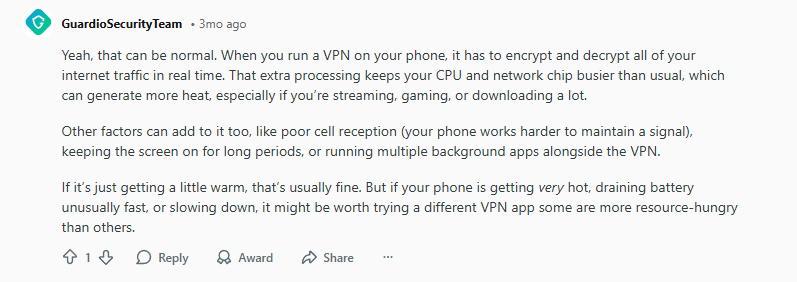
User GuardioSecurityTeam provided a detailed, accurate breakdown of why your phone heats up:
“When you run a VPN on your phone, it has to encrypt and decrypt all of your internet traffic in real time. That extra processing keeps your CPU and network chip busier than usual, which can generate more heat, especially if you’re streaming, gaming, or downloading a lot.”
Think of it like this: Normally, your phone’s processor sends data freely. With a VPN, it must first pack every bit of data into a secure, encrypted box before sending it, and then unpack incoming boxes. This extra packaging work requires energy, which creates heat.
2. The #1 Fix: Switch to a Modern Protocol (Does a VPN Make Your Phone Hot?)
The single most effective solution was repeated by multiple users: ditch old protocols for WireGuard. User CatalMF stated it simply:
“Use light protocols like wireguard.”

User IHasTheZoomies confirmed this from personal experience:
“I use wireguard and it doesn’t get hot. Some apps could use more inefficient protocols…”

3. The “It Shouldn’t” Reassurance (Does a VPN Make Your Phone Hot?)
For users with powerful modern phones, the effect might be negligible. User Slinkwyde offered this reassurance:
“Boy, for me the difference is zero. I always leave it on in the background and it doesn’t affect the performance of my phone at all… It doesn’t make the slightest difference in performance or heating.”

This is an important point. On a modern iPhone or high-end Android, a well-optimized VPN should not cause noticeable overheating during normal use. If it does, it’s a sign of a poorly made app.
4. The Bottom-Line Advice: Go Paid (Does a VPN Make Your Phone Hot?)
The collective wisdom of the thread points to one clear conclusion, as summed up by Assist_Federal:
“Paid VPN is better.”

Step-by-Step: How to Cool Down Your VPN Phone
Step 1: Change Your VPN Protocol (Does a VPN Make Your Phone Hot?)
- Open your VPN app’s Settings.
- Find the Protocol or Connection settings.
- Switch from “OpenVPN” or “IKEv2” to “WireGuard”.
- Reconnect and monitor your phone’s temperature.
Step 2: Suspect and Remove Free VPNs (Does a VPN Make Your Phone Hot?)
- If you’re using a free VPN, uninstall it immediately.
- Research and choose a reputable paid provider (see recommendations below).
Step 3: General Phone Cooling Tips (Does a VPN Make Your Phone Hot?)
- Close background apps you aren’t using.
- Turn down your screen brightness.
- Take off your phone case temporarily to help dissipate heat.
- Avoid using your phone while it’s charging, as this already generates heat.
Best VPNs That Won’t Overheat Your Phone (2025)
You need a VPN that uses efficient protocols and is built with mobile performance in mind.
1. NordVPN: Best for Built-In Efficiency (NordLynx) (Does a VPN Make Your Phone Hot?)
2. Surfshark: Best Lightweight All-Rounder (Does a VPN Make Your Phone Hot?)
3. Proton VPN: Best for Transparency & Control (Does a VPN Make Your Phone Hot?)
Overheating Troubleshooting Checklist (Does a VPN Make Your Phone Hot?)
✅ If your phone is HOT:
- Immediately switch to the WireGuard protocol.
- Uninstall any free VPN apps.
- Check for other culprits: poor cell signal, direct sunlight, a demanding game running.
✅ If your phone is WARM (Normal):
- Ensure you’re using a reputable paid VPN.
- Keep your VPN app updated.
- Close other unused background apps.
✅ If the problem continues:
- Try a different VPN server (a less congested one).
- As a last resort, contact your VPN’s support—you may have a faulty app installation.
Frequently Asked Questions (Does a VPN Make Your Phone Hot?)
Q: Is it dangerous if my phone gets hot from a VPN?
A: Modern phones are designed to throttle performance or shut down before heat causes damage. Consistent, excessive heat is bad for long-term battery health, but a warm phone during heavy VPN use is generally not dangerous—just inconvenient.
Q: Can a VPN damage my phone’s battery?
A: Indirectly, yes. Consistently high temperatures and the extra CPU load can accelerate battery wear over a long period. Using an efficient VPN helps minimize this impact.
Q: Should I turn off my VPN when not in use to save battery/heat?
A: For maximum privacy, it’s best to leave it on. With a modern VPN using WireGuard, the battery and heat impact should be minimal. If you’re using an old protocol or a free VPN, turning it off when not needed is a good idea.
Leave a Reply