You’re sitting in a coffee shop, connected to the free WiFi, scrolling through your phone or catching up on work. It feels harmless—until you learn that a hacker sitting a few tables away could be silently intercepting everything you do by performing an ARP spoofing. One concerned user recently asked the security community:
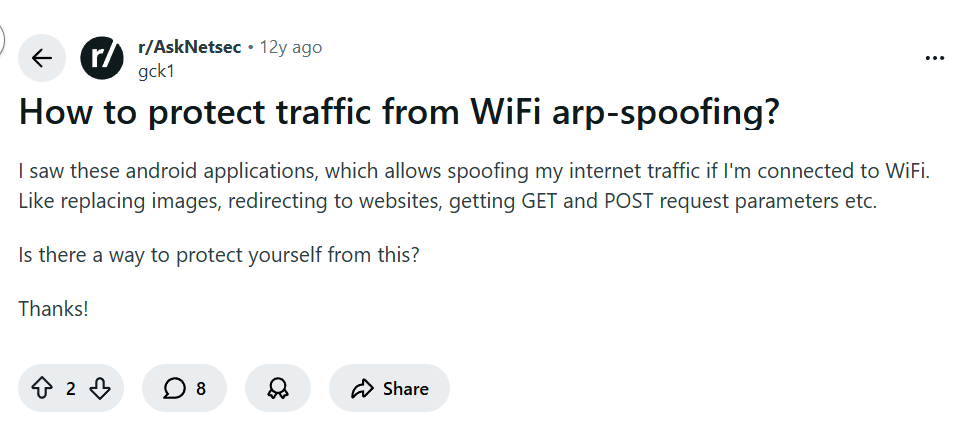
This isn’t just theoretical. ARP spoofing—also called ARP poisoning—is a real attack where someone on the same network tricks your device into sending your internet traffic through their computer. They can see everything: passwords, messages, images, and even redirect you to fake websites. So, how do you defend yourself?
Understanding the Threat: ARP Spoofing in Plain English
When you connect to a WiFi network, your device needs to know how to communicate with the router. It uses something called the Address Resolution Protocol (ARP) to map IP addresses to physical device addresses (MAC addresses). In an ARP spoofing attack, a hacker sends fake ARP messages to your device, pretending to be the router. Your device gets tricked and starts sending all its traffic to the hacker instead.
Once they’re in the middle after performing ARP spoofing, they can:
- Capture login credentials
- Inject malicious content into web pages
- Redirect you to phishing sites
- Monitor your browsing in real time
Scary, right? Especially since, as one commenter bluntly put it:
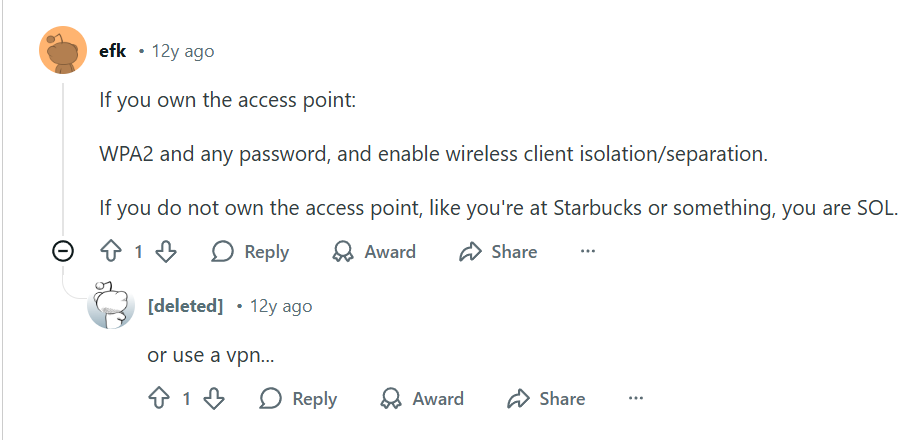
“SOL” means “out of luck”—unless you take the right precautions.
Your Best Defense: A VPN (Virtual Private Network)
Fortunately, the same thread held the solution. Another user cut straight to the point:
“or use a vpn…”
This simple advice is your strongest shield. When you connect to a VPN, all your internet traffic is encrypted before it leaves your device and sent through a secure tunnel to a VPN server. Even if a hacker successfully performs ARP spoofing and redirects your traffic, all they’ll see is encrypted data—impossible to read or manipulate.
Another expert expanded on the layered approach:
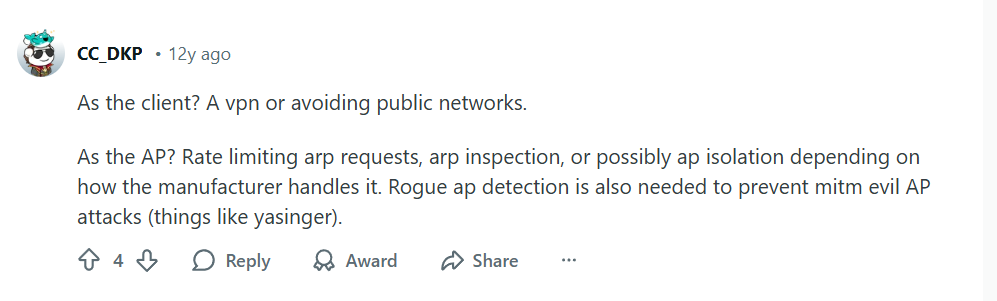
Let’s break down what this means for you as a user.
For Everyday Protection: Always Use a VPN on Public Networks
Whether you’re at a café, airport, hotel, or even a coworking space, your first action should be to activate your VPN. It neutralizes ARP spoofing attacks completely because:
- Encryption renders intercepted data useless – Hackers can’t read what they can’t decrypt.
- Your real IP address is hidden – The VPN server’s IP is what’s visible on the local network.
- Secure tunneling prevents manipulation – Even if redirected, your connection to the VPN remains secure.
Choosing the Right VPN for Security
Not all VPNs are equal when it comes to security. Look for these features:
- Strong Encryption Protocols – OpenVPN or WireGuard protocols offer excellent security and speed.
- Automatic Kill Switch – If your VPN connection drops, this immediately cuts your internet to prevent data leaks.
- DNS Leak Protection – Ensures all your requests are routed through the VPN’s encrypted DNS servers.
- Verified No-Logs Policy – Your activity isn’t recorded or stored.
Top Recommendations for Security:
- NordVPN – Offers Threat Protection that blocks malicious sites and includes a reliable kill switch.
- Surfshark – Provides Camouflage Mode and MultiHop connections for extra security layers.
- ProtonVPN – Built with strong focus on security and privacy, based in Switzerland with strict privacy laws.
Additional Protective Measures
While a VPN is your primary defense, consider these additional precautions:
- Use HTTPS Everywhere – Ensure websites use HTTPS (look for the padlock icon). Modern browsers help, but it’s not foolproof against all ARP attacks.
- Enable Your Firewall – Your device’s firewall can sometimes detect and block suspicious ARP activity.
- Avoid Sensitive Transactions – Never do online banking or enter passwords on public WiFi without a VPN.
- For Network Administrators – If you control the network, implement ARP inspection, client isolation, and rate limiting as mentioned in the comments.
What If You Own the Network?
If you’re securing your home or office WiFi, you have more options:
- Use WPA2/WPA3 encryption – Never use open or WEP-secured networks.
- Enable Client Isolation – This prevents devices on your network from communicating directly with each other.
- Regularly Update Router Firmware – Manufacturers often patch security vulnerabilities.
- Monitor Connected Devices – Regularly check for unfamiliar devices on your network.
The Bottom Line: Don’t Be SOL
The reality is that public WiFi networks are inherently risky. As the original commenter stated, without protection, you’re vulnerable. But with a reliable VPN, you transform from a potential victim to a secure user.
Think of a VPN not as a “nice-to-have” but as essential digital hygiene—like locking your door or wearing a seatbelt. In today’s world of sophisticated cyber threats, especially on public networks, it’s your simplest and most effective defense against ARP spoofing and numerous other attacks.
Don’t wait until you’re compromised. Secure your connections today with a trusted VPN service.
Ready to protect yourself from ARP spoofing and other WiFi threats? Get started with NordVPN for advanced security features, try Surfshark for comprehensive protection on all devices, or explore ProtonVPN for privacy-focused security.
Leave a Reply