It’s a feeling many of us share: logging into social media can sometimes feel less like connecting and more like walking into a surveillance room. Every click, like, and scroll is tracked, packaged, and sold. As one user recently put it:
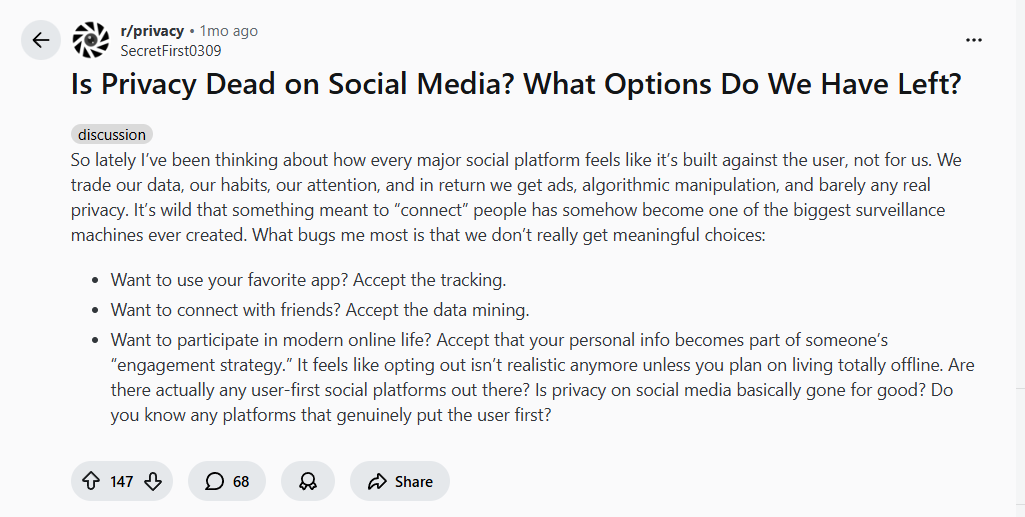
This isn’t paranoia—it’s the reality of today’s attention economy. Social platforms are designed to collect data, optimize engagement, and serve ads. But does that mean privacy is completely dead? Not if you’re willing to take a few intentional steps. Let’s explore what’s happening behind the screen and what you can actually do about it.
Why Social Media Feels Like a Surveillance Machine
When you sign up for a social platform, you’re not the customer—you’re the product. Your personal information, interests, behaviors, and networks are monetized through:
- Behavioral tracking across websites and apps
- Location data collection
- Facial recognition in photos
- Cross-platform profiling (ever noticed ads following you from Instagram to your browser?)
As one commenter starkly noted, your identity isn’t safe just because you use a fake name:
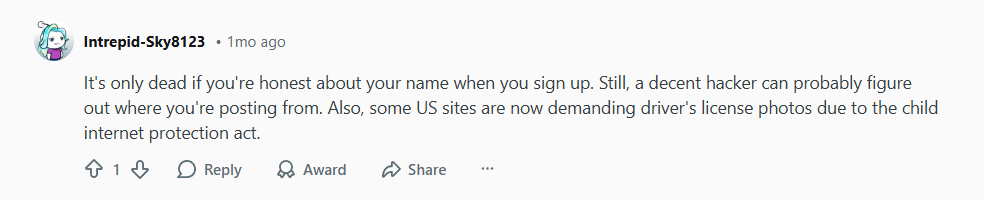
Between sophisticated tracking and even government-led identification demands in some regions, anonymity feels fragile. But that doesn’t mean you’re powerless.
A Practical Privacy Toolkit for Social Media Users
You don’t have to quit social media entirely to protect your privacy. Think in layers. Here are actionable steps to reduce your digital footprint while still staying connected.
1. Use a Dedicated, Privacy-Focused Browser
One of the simplest yet most effective habits is browser separation. As a savvy user recommended:

- Use Brave or Firefox Focus for social media only—in private browsing mode.
- Keep your main browser (like Firefox with strong privacy extensions) for everything else.
- Benefit: This limits cross-site tracking and prevents social networks from following you around the rest of the web.
2. Avoid Using Social Media Apps When Possible
Mobile apps often request far more permissions than the browser version: microphone, contacts, location, gallery access. Using the mobile website instead can dramatically reduce the data you hand over.
3. Enable a VPN – Your Connection’s Privacy Layer
This is where a VPN becomes essential, especially for social media use. Here’s why:
- IP Masking: Every time you log in, your IP address reveals your approximate location and internet provider. A VPN hides your real IP, making it much harder to track you geographically or link your accounts across sessions.
- Public Wi-Fi Security: Browsing social media on café or airport Wi-Fi? A VPN encrypts your connection, preventing snoopers from intercepting your login details or session data.
- Reducing Profile Accuracy: By masking your IP and location, you limit the data points platforms can use to build—and sell—a profile about you.
4. Adjust Your Social Media Privacy Settings (Ruthlessly)
Go beyond the defaults. Regularly:
- Disable ad personalization
- Limit data sharing with “partners”
- Turn off location history
- Make your profiles and posts visible to “Friends Only” where possible
5. Consider Alternative, Privacy-Respecting Platforms
While mainstream networks dominate, user-first alternatives exist:
- Mastodon (decentralized, open-source)
- Signal (private messaging)
- PixelFed (Instagram alternative)
These platforms are built with privacy by design, not as an afterthought.
Where a VPN Fits Into Your Social Media Strategy
Think of a VPN not as a magic cloak, but as one essential layer in a multi-layered defense. It won’t stop tracking within the app itself—if you’re logged into Facebook, Facebook still knows it’s you—but it does:
- Hide your traffic from your ISP
- Secure you on untrusted networks
- Obscure your location and IP-based identity
- Prevent network-level snooping and session hijacking
For the best protection, combine a VPN with privacy browsers, strict settings, and conscious sharing habits.
Recommended Tools for a Privacy-Conscious Social Life
- VPNs:
- NordVPN (Threat Protection blocks trackers)
- Surfshark (Unlimited devices, Camouflage Mode)
- ProtonVPN (Strong no-logs policy, based in Switzerland)
- Browsers: Brave (built-in ad/tracker blocking), Firefox with uBlock Origin and Privacy Badger.
- Extensions: uBlock Origin, Privacy Badger, Cookie AutoDelete.
Conclusion: Privacy Isn’t Dead—It’s Just Requires Effort
Privacy on social media isn’t gone; it’s just been overshadowed by convenience and business models designed to exploit data. By adopting tools like VPNs, using privacy browsers, avoiding apps, and tightening your settings, you can significantly reclaim control.
You don’t have to disappear offline to protect your digital self. You just need to be smarter than the default settings.
Ready to take the first step toward social media privacy? Start by securing your connection with a trusted VPN like NordVPN, Surfshark, or ProtonVPN, and browse with intention—not by default.
Leave a Reply