VPN Beginner Guide:
If you’re new to the world of VPNs, you’re not alone. The mix of tech jargon, privacy promises, and setup steps can feel overwhelming. One curious beginner recently laid out their questions plainly—and they’re the exact same questions thousands of people are searching for every day.
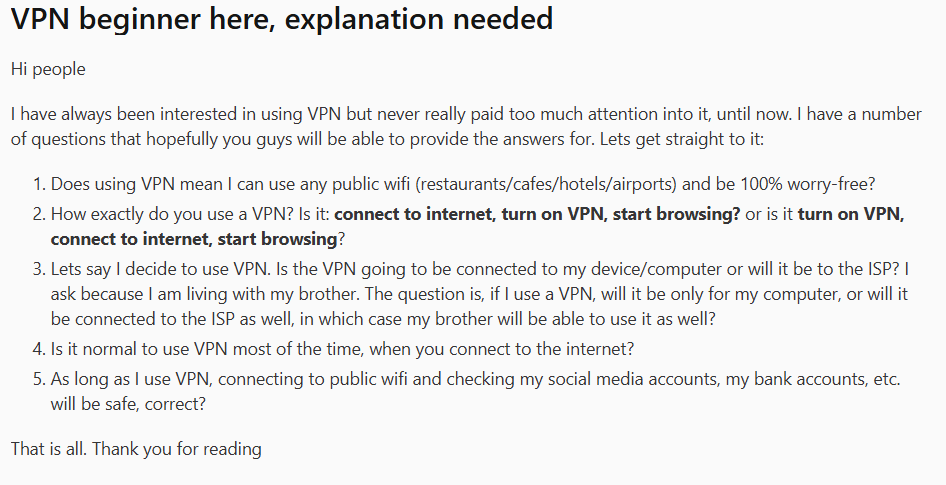
Let’s walk through each of these points with clear, straightforward answers, backed by insights from the VPN community. By the end, you’ll know exactly how a VPN works, how to use it, and whether you should keep it on all the time.
1. Does a VPN Make Public Wi-Fi 100% Safe? (VPN Beginner Guide)
Short answer: No, but it makes it much safer.
A VPN encrypts your internet traffic, turning it into a secure tunnel between your device and the VPN server. This means that even if you’re on a risky café or airport network, hackers can’t easily intercept your data.
However, as one Reddit user wisely clarified:
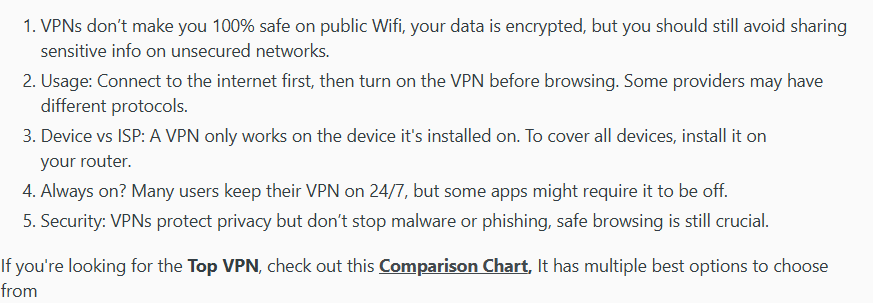
Think of a VPN like a sealed envelope for your mail—it hides the contents, but it doesn’t stop someone from tricking you into putting the wrong thing inside. You should still avoid entering sensitive info on sketchy sites, use strong passwords, and keep your device’s firewall enabled.
2. How Exactly Do You Use a VPN? (VPN Beginner Guide)
Correct order: Connect to the internet → Turn on VPN → Start browsing.
Here’s the step-by-step:
- Connect to your Wi-Fi or cellular network as usual.
- Open your VPN app and log in.
- Choose a server (often “Fastest” or a nearby country is fine).
- Click “Connect.”
- Once connected, browse normally.
3. Does a VPN Protect One Device or the Whole Household? (VPN Beginner Guide)
A VPN is installed per device—not per internet connection. If you install it on your laptop, only your laptop’s traffic is encrypted. Your brother’s phone, smart TV, and gaming console will not be protected.
To cover your whole home network, you’d need to:
- Install the VPN on your router (advanced setup), or
- Use a VPN that allows multiple simultaneous connections (5–10 devices is common).
Most households opt for the multi-device plan. It’s easier and ensures every phone, tablet, and laptop stays protected.
4. Should You Leave Your VPN On All the Time? (VPN Beginner Guide)
For most people, yes. Keeping your VPN on 24/7 ensures:
- Constant encryption on all networks
- No accidental data leaks
- Consistent privacy protection
There are rare cases where you might turn it off:
- Certain banking or work apps that block VPN connections
- Local gaming servers that require low latency
- Troubleshooting internet connectivity issues
But for everyday browsing, streaming, and social media, leaving it on is the recommended practice.
5. Can I Safely Check Bank Accounts on Public Wi-Fi with a VPN? (VPN Beginner Guide)
Yes, but with an important caveat.
A VPN encrypts your connection, making it extremely difficult for anyone on the same network to snoop on your banking login or transactions. This is a massive security upgrade over using public Wi-Fi without protection.
However, a VPN does not protect you from:
- Phishing websites that look like your bank
- Keyloggers or malware already on your device
- Weak or reused passwords
Always ensure you’re on the legitimate bank website (look for https:// and the padlock icon) and use strong, unique passwords alongside your VPN.
How a VPN Actually Works – In Simple Terms (VPN Beginner Guide)
A clear explanation from a Reddit user breaks it down perfectly:

In essence:
- Your data is encrypted on your device.
- It travels securely to the VPN server.
- The VPN server decrypts it and sends it to the internet.
- Returning data takes the same secure path back.
This process hides your activity from your ISP and anyone else on your local network. It also masks your real IP address, making your online actions much harder to trace back to you.
Choosing Your First VPN: What to Look For (VPN Beginner Guide)
As a beginner, you want a VPN that’s:
- Easy to use – clean apps, one-click connect
- Secure – strong encryption, no-logs policy
- Fast – won’t slow down streaming or browsing
- Multi-device – protects all your gadgets
Top recommendations for beginners:
- NordVPN: Intuitive apps, strong security, and reliable speeds. Great all-rounder.
- Surfshark: Unlimited device connections, very beginner-friendly, excellent value.
- ProtonVPN: Strong focus on privacy and transparency, with a trustworthy free tier to test.
Final Checklist for VPN Newbies (VPN Beginner Guide)
Before you take the plunge:
- Decide how many devices you need to protect
- Pick a reputable VPN with a money-back guarantee
- Install the app and use auto-connect for public Wi-Fi
- Remember: VPN + good browsing habits = true safety
- Test it out for a month—see how it fits into your daily routine
Bottom line: A VPN is one of the easiest and most effective ways to boost your online privacy. You don’t need to be a tech expert to use one—you just need to pick a reliable service and turn it on.
Ready to get started? Choose a beginner-friendly VPN like NordVPN, Surfshark, or ProtonVPN and take control of your digital privacy in minutes.
Leave a Reply