VPN Privacy: Using a VPN at work to bypass blocks or maintain some privacy is more common than you might think. But it raises a critical question that many employees are quietly asking:
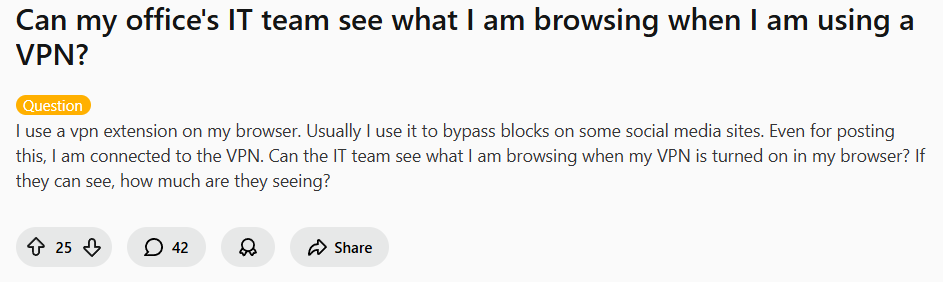
The short answer isn’t simple: It depends on whether you’re using a personal device or a company-owned computer and how your IT team monitors the network. Let’s break down what’s visible, what’s hidden, and where the real risks lie—using insights from IT professionals and security experts on Reddit.
The Two Scenarios: Personal Device vs. Company Computer (VPN Privacy)
Scenario 1: You’re Using a Personal Device on the Office Network
If you bring your own laptop, phone, or tablet and connect to the office Wi-Fi with a VPN enabled, you have a significant layer of protection.
A network administrator explained what they can typically see in this case:
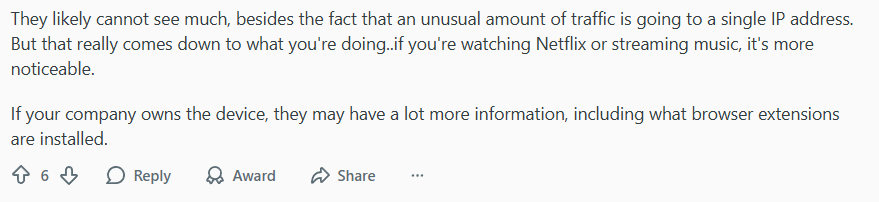
What IT likely sees:
- An encrypted stream of data going to a single IP address (your VPN server)
- The amount of data being transferred
- That you’re connected to a VPN service
What they likely CAN’T see:
- Specific websites you visit
- Search terms, messages, or login details
- Content of your communications (if encrypted)
Scenario 2: You’re Using a Company-Owned Device
This is where privacy evaporates quickly. If IT has full administrative access to your work laptop—which they almost always do—a browser VPN extension offers limited protection.
One technical user laid out the stark reality:
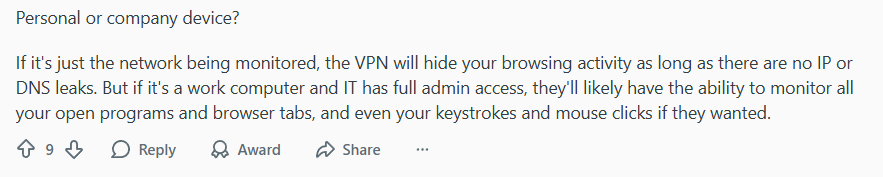
On a managed company device, IT can potentially:
- Monitor all running applications and browser tabs
- Log keystrokes (keylogging)
- Take screenshots periodically
- Track file downloads and USB usage
- See installed extensions (including your VPN)
In this case, a VPN might hide the destination of your traffic from network snooping, but it won’t stop endpoint monitoring software already on your machine.
How Network Monitoring Actually Works: A Simple Analogy for VPN Privacy
An IT professional offered a helpful analogy to understand the visibility chain:
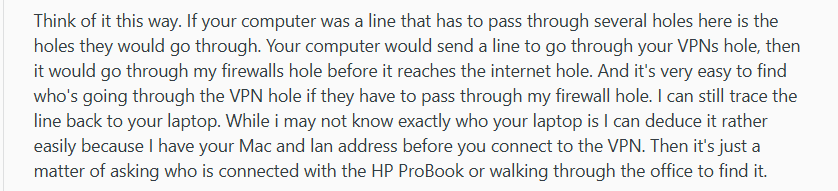
Think of it like this:
- Your device has a unique identifier (MAC address) that IT records when you join the network.
- Even if you then turn on a VPN, that initial handshake is logged.
- IT can correlate encrypted VPN traffic back to your device’s identifier.
- While they might not know exactly what you’re browsing, they know who is generating unusual encrypted traffic.
This doesn’t mean they’re actively watching you, but the technical capability exists.
What a VPN Privacy Actually Protects You From at Work
Even on a company device, a quality VPN still provides valuable protection:
- Hides specific websites from network-level monitoring
- Encrypts your data from local network snoopers
- Bypasses URL-based filters for blocked sites
- Protects from other employees on the same network
Key distinction: A VPN protects you from network surveillance, but not from device surveillance.
Recommended Use Cases (and What to Avoid)
✅ Generally Safe with a VPN:
- Browsing news sites during break
- Checking personal email
- Reading social media (if not explicitly banned)
- Light shopping during lunch
⚠️ Risky Even with a VPN:
- Accessing inappropriate or illegal content
- Large streaming or torrenting (obvious bandwidth spike)
- Anything violating company policy
- Sensitive personal activities (banking, medical)
Choosing the Right VPN Privacy for Work
If you’re using a personal device on work networks, look for a VPN with:
- Strong encryption (AES-256, WireGuard protocol)
- DNS leak protection (crucial for preventing slips)
- Kill switch (stops data if VPN drops)
- No-logs policy (so even the VPN provider doesn’t record your activity)
Top recommendations for workplace privacy:
- NordVPN: Excellent security features including Double VPN and Threat Protection.
- Surfshark: CleanWeb feature blocks ads and malware, with unlimited devices.
- ProtonVPN: Strong privacy focus, based in Switzerland with strict privacy laws.
The Ethical and Practical Bottom Line of VPN Privacy
- Check your company policy – Many employers explicitly prohibit VPN use.
- Assume limited privacy on company devices – They’re for work.
- Use personal devices for personal activities – Keep work and personal separate.
- Consider the purpose – If you’re hiding something from your employer, reconsider your actions.
A VPN is a tool for privacy, not secrecy. It’s best used to protect legitimate personal browsing on your own devices, not to circumvent reasonable workplace policies.
Final Verdict: Can They See What You’re Browsing?
On your personal device: IT can see you’re using a VPN and how much data you’re moving, but not the specific content if your VPN is working properly.
On a company device: Assume full visibility. A VPN only encrypts traffic between your device and the VPN server—it doesn’t disable monitoring software already installed.
Bottom line: For true privacy at work, use a reliable VPN on your personal smartphone with cellular data, not office Wi-Fi. For everything else, remember: if you wouldn’t want your boss to see it, don’t do it on a work computer.
Looking to protect your personal browsing? Consider a trusted VPN like NordVPN for robust security, Surfshark for multi-device coverage, or ProtonVPN for strong privacy guarantees. Just use it on your own devices, during your own time.
Leave a Reply