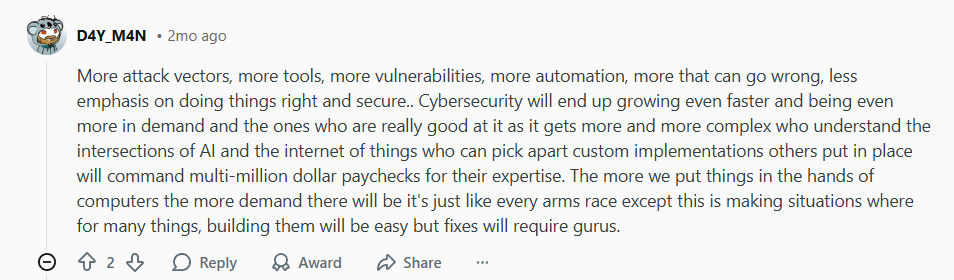
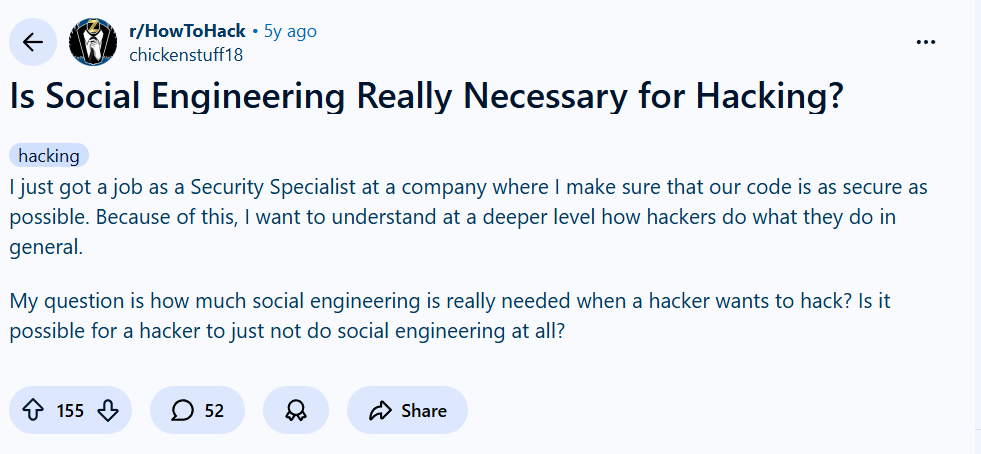
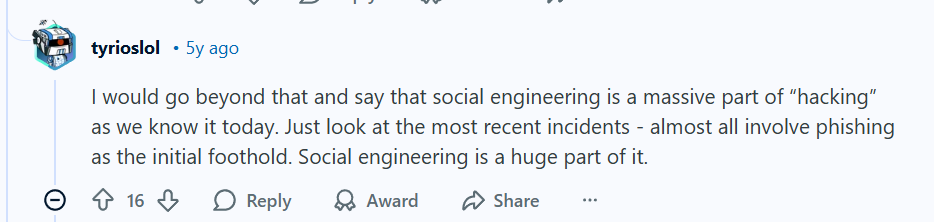
The digital landscape is evolving at a staggering pace, and with it, the nature of online threats is transforming. In cybersecurity discussions, experts are already looking ahead, warning that the coming years won’t just be about more sophisticated malware—they’ll be about more attack surfaces, more automation, and more human vulnerability. As one analyst put it:
This paints a clear picture in cybersecurity: as technology grows more complex, so do the risks. But what does that mean for everyday users? And in a world where AI and automation dominate the conversation, where does human responsibility fit in?
The Double-Edged Sword of Automation in Cybersecurity
There’s a growing reliance on AI-driven security tools, but experienced professionals caution against over-automation. One deleted but insightful comment highlighted a critical truth:
This is a crucial reminder: software alone cannot fully secure software. AI can detect patterns, filter threats, and respond at machine speed, but human oversight—confirmation, configuration, and critical thinking—remains irreplaceable. This is especially true as attacks become more personalized and socially engineered.
The Unchanging Weakest Link: You
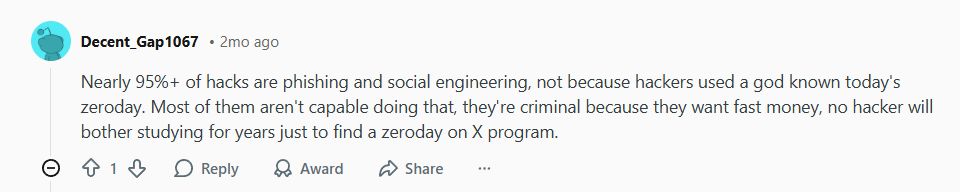
Despite advances in AI and defensive tech, one harsh reality remains unchanged: the majority of successful breaches don’t start with a complex zero-day exploit. They start with a simple human mistake. As another user bluntly stated:
Phishing, pretexting, and social engineering account for the overwhelming majority of breaches. Criminals aren’t always master coders—they’re opportunists looking for the fastest path to money or data. And that path often runs straight through an inbox, a direct message, or a cleverly spoofed login page.
What This Means for Personal and Business Cybersecurity
The intersection of these trends tells us two things:
Defense must be layered and intelligent—combining AI tools with human vigilance.
Protection must start long before a phishing link is clicked—at the network and connection level.
This is where tools like VPNs stop being “nice-to-haves” and start becoming foundational components of modern digital hygiene.
How a VPN Fits into the Future Cybersecurity Stack
1. It Secures the Connection, Not Just the Endpoint
While endpoint security (antivirus, firewalls) is vital, a VPN protects your data in transit—especially on unsecured or public networks where man-in-the-middle attacks and session hijacking are common.
2. It Reduces Attack Surface
By masking your real IP address, a VPN makes it harder for attackers to target you specifically based on location or ISP data—information often used to personalize phishing attacks.
3. It Complicates Tracking and Profiling
With widespread data collection fueling both ads and targeted attacks, a VPN helps obscure your digital footprint, making you a less visible and less attractive target.
4. It’s an Automated Layer That Works 24/7
Unlike manual security steps, a reliable VPN operates continuously in the background, encrypting traffic without requiring user intervention—a set-and-forget layer of always-on security.
Building Your Personal Cybersecurity Posture for 2025 and Beyond
In a world where both attacks and defenses are growing more automated, your strategy should be balanced:
Use AI-enhanced tools for detection and filtering.
Keep human awareness sharp—question unexpected messages, verify requests, and stay educated on common scams.
Implement foundational privacy tech like VPNs to secure your connection by default.
Encrypt, back up, and authenticate—make multi-factor authentication (MFA) mandatory wherever possible.
Choosing a VPN for Future-Ready Cybersecurity
Not all VPNs are built for the evolving threat landscape. Look for providers that offer:
Final Thought: Cybersecurity Is a Mindset, Not Just Software
As we move into an era of AI-driven attacks and automated defenses, one principle remains timeless: security is a shared responsibility between technology and people. Tools like VPNs provide essential protection at the network level, but they work best when combined with informed, cautious online behavior.
Don’t wait for the next wave of attacks to upgrade your defenses. Start with a secure foundation today.
Ready to future-proof your online presence? Explore how NordVPN can serve as your always-on first layer of defense, or check out Surfshark for all-in-one security. For those prioritizing privacy above all, ProtonVPN offers a transparent, principle-driven alternative.
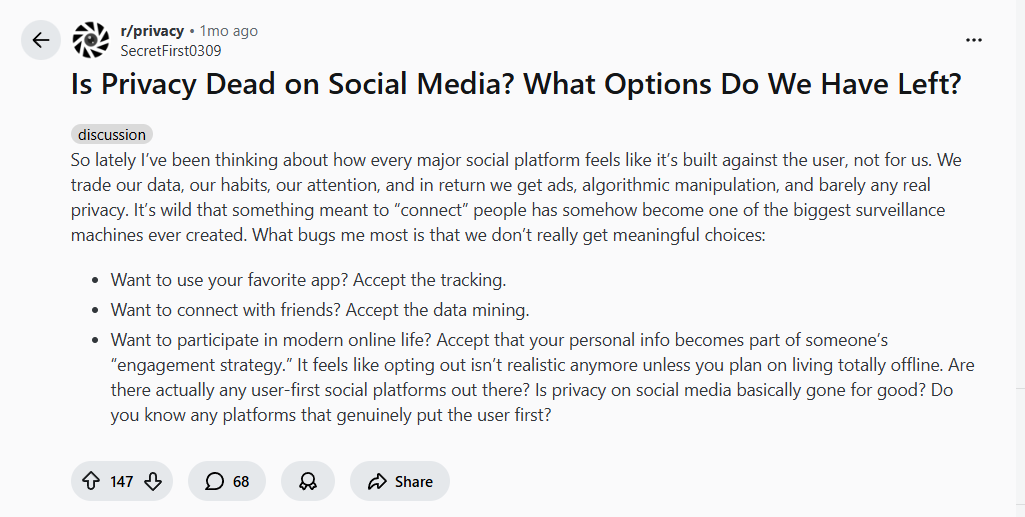
It’s a feeling many of us share: logging into social media can sometimes feel less like connecting and more like walking into a surveillance room. Every click, like, and scroll is tracked, packaged, and sold. As one user recently put it:
This isn’t paranoia—it’s the reality of today’s attention economy. Social platforms are designed to collect data, optimize engagement, and serve ads. But does that mean privacy is completely dead? Not if you’re willing to take a few intentional steps. Let’s explore what’s happening behind the screen and what you can actually do about it.
Why Social Media Feels Like a Surveillance Machine
When you sign up for a social platform, you’re not the customer—you’re the product. Your personal information, interests, behaviors, and networks are monetized through:
Behavioral tracking across websites and apps
Location data collection
Facial recognition in photos
Cross-platform profiling (ever noticed ads following you from Instagram to your browser?)
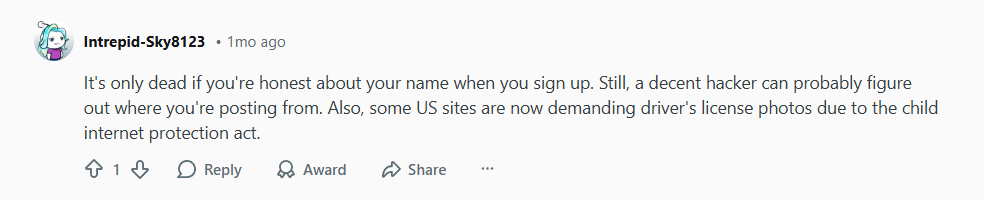
As one commenter starkly noted, your identity isn’t safe just because you use a fake name:
Between sophisticated tracking and even government-led identification demands in some regions, anonymity feels fragile. But that doesn’t mean you’re powerless.
A Practical Privacy Toolkit for Social Media Users
You don’t have to quit social media entirely to protect your privacy. Think in layers. Here are actionable steps to reduce your digital footprint while still staying connected.
1. Use a Dedicated, Privacy-Focused Browser
One of the simplest yet most effective habits is browser separation. As a savvy user recommended:
Use Brave or Firefox Focus for social media only—in private browsing mode.
Keep your main browser (like Firefox with strong privacy extensions) for everything else.
Benefit: This limits cross-site tracking and prevents social networks from following you around the rest of the web.
2. Avoid Using Social Media Apps When Possible
Mobile apps often request far more permissions than the browser version: microphone, contacts, location, gallery access. Using the mobile website instead can dramatically reduce the data you hand over.
This is where a VPN becomes essential, especially for social media use. Here’s why:
IP Masking: Every time you log in, your IP address reveals your approximate location and internet provider. A VPN hides your real IP, making it much harder to track you geographically or link your accounts across sessions.
While mainstream networks dominate, user-first alternatives exist:
Mastodon (decentralized, open-source)
Signal (private messaging)
PixelFed (Instagram alternative)
These platforms are built with privacy by design, not as an afterthought.
Where a VPN Fits Into Your Social Media Strategy
Think of a VPN not as a magic cloak, but as one essential layer in a multi-layered defense. It won’t stop tracking within the app itself—if you’re logged into Facebook, Facebook still knows it’s you—but it does:
Hide your traffic from your ISP
Secure you on untrusted networks
Obscure your location and IP-based identity
Prevent network-level snooping and session hijacking
For the best protection, combine a VPN with privacy browsers, strict settings, and conscious sharing habits.
Recommended Tools for a Privacy-Conscious Social Life
Conclusion: Privacy Isn’t Dead—It’s Just Requires Effort
Privacy on social media isn’t gone; it’s just been overshadowed by convenience and business models designed to exploit data. By adopting tools like VPNs, using privacy browsers, avoiding apps, and tightening your settings, you can significantly reclaim control.
You don’t have to disappear offline to protect your digital self. You just need to be smarter than the default settings.
Ready to take the first step toward social media privacy? Start by securing your connection with a trusted VPN like NordVPN, Surfshark, or ProtonVPN, and browse with intention—not by default.
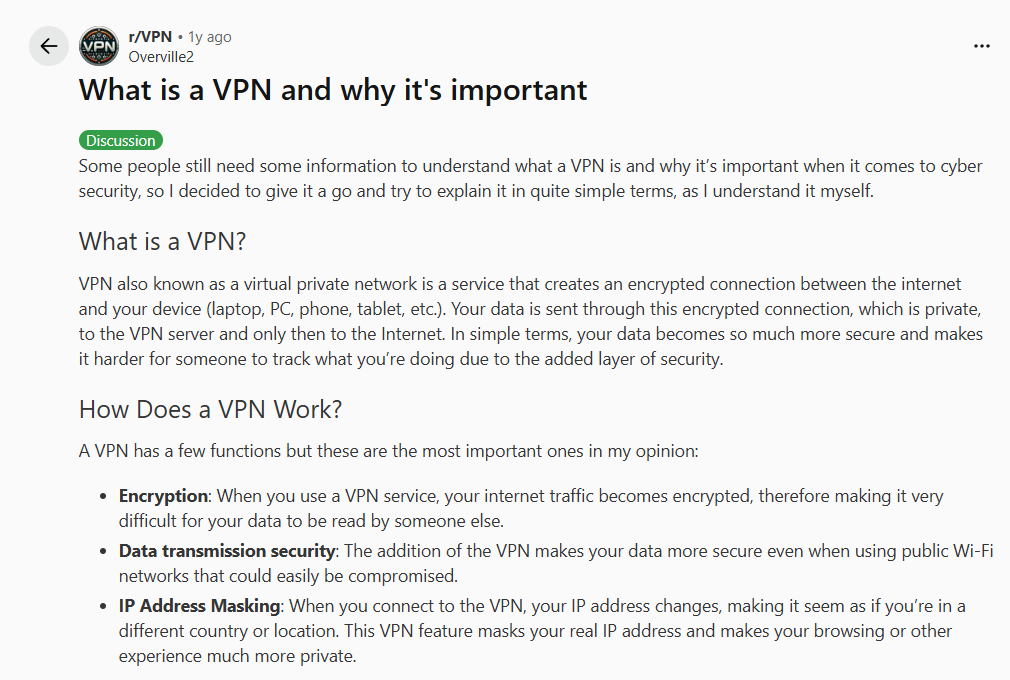
Some people still need a clear, straightforward explanation of what is a VPN and why it matters for online security. If you’ve ever felt confused by tech jargon or wondered whether a VPN is really for you, you’re not alone. Let’s break it down in simple terms.
What is a VPN?
A VPN, or Virtual Private Network, is a service that creates a secure, encrypted connection between your device—whether it’s a laptop, phone, or tablet—and the internet. Instead of your data traveling directly from your device to the web, it first passes through a private, encrypted tunnel to a VPN server, and only then goes out to the internet.
In everyday language, this means your online activity becomes much harder to spy on. It’s like sending a letter in a locked, tamper-proof envelope instead of on a postcard for anyone to read along the way.
How Does a VPN Actually Work?
To understand what is a VPN, someone should know how a VPN works. A VPN performs three key functions that together shield your digital life:
Encryption: Your internet traffic is scrambled into unreadable code, making it virtually impossible for hackers, your ISP, or even public Wi-Fi snoopers to see what you’re doing.
Secure Data Transmission: Especially on risky networks—like airport or café Wi-Fi—a VPN wraps your data in a layer of security, protecting it from interception.
IP Address Masking: When you connect through a VPN server, your real IP address (which reveals your location and identity) is hidden. Websites see the VPN server’s IP instead, making your browsing private and location-independent.
Why is a VPN Important? 5 Real-World Reasons
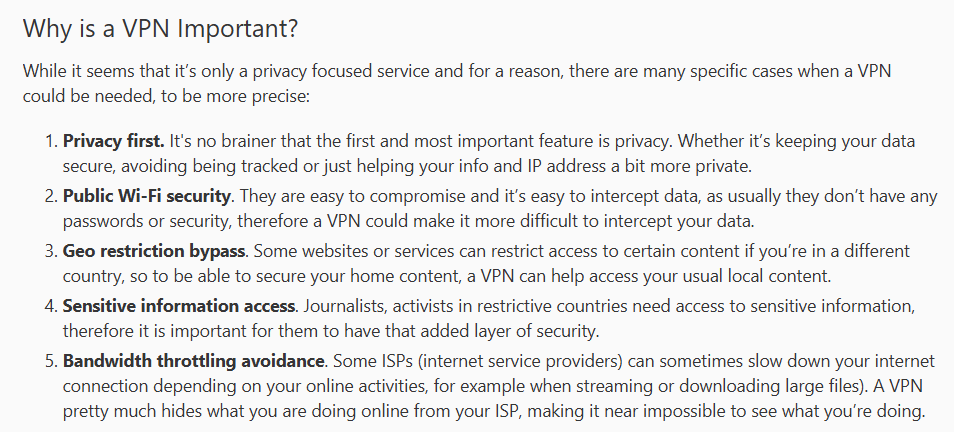
To deepen the understanding about what is a VPN, it is highly beneficial for someone to know about the importance of VPNs in the real world. While privacy is the headline feature, a VPN serves multiple practical roles in today’s connected world. Here are five specific situations where a VPN isn’t just useful—it’s essential:
Privacy First It’s not just about hiding—it’s about owning your data. From avoiding invasive tracking to keeping your IP address private, a VPN puts you back in control of your digital footprint.
Public Wi-Fi Security Public networks are notoriously easy to hack. With no password or weak security, your emails, passwords, and bank details are at risk. A VPN encrypts everything, making interception nearly impossible.
Bypass Geo-Restrictions Whether you’re traveling abroad and want to watch your home country’s Netflix or need to access region-locked news sites, a VPN lets you appear as if you’re browsing from another location.
Access Sensitive Information Safely For journalists, activists, or anyone in restrictive regions, a VPN isn’t a luxury—it’s a lifeline. It provides a critical layer of security when accessing or sharing sensitive content.
Avoid Bandwidth Throttling Some internet providers slow down your connection when you stream or download large files. Since a VPN hides your activity, your ISP can’t selectively throttle your speed based on what you’re doing.
Who Really Needs a VPN?
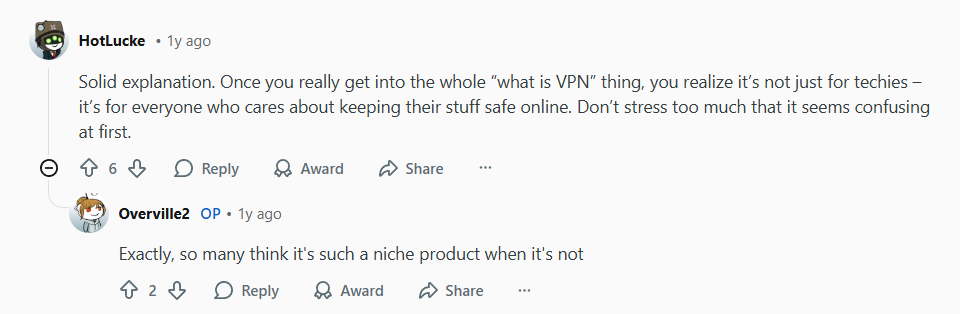
Before this we talk about what is a VPN. Now to clarify, there’s a common misconception that VPNs are only for tech experts or people with something to hide. But as one insightful commenter put it:
That’s the key takeaway: VPNs are for everyone who cares about keeping their online activity safe and private. Whether you’re shopping online, working from a coffee shop, streaming shows while traveling, or just browsing at home—you deserve protection.
If VPNs still seem confusing or you still don’t get it about the term “What is a VPN”, remember—you don’t need to be an expert to benefit from one. In today’s digital world, using a VPN is as basic as locking your door at night. It’s a simple habit that provides profound peace of mind.
You’re not hiding—you’re protecting. And that’s something everyone who uses the internet deserves.
Ready to take the next step in securing your online life? Explore NordVPN for top-tier security, try Surfshark for unlimited coverage, or consider ProtonVPN for privacy-first protection.
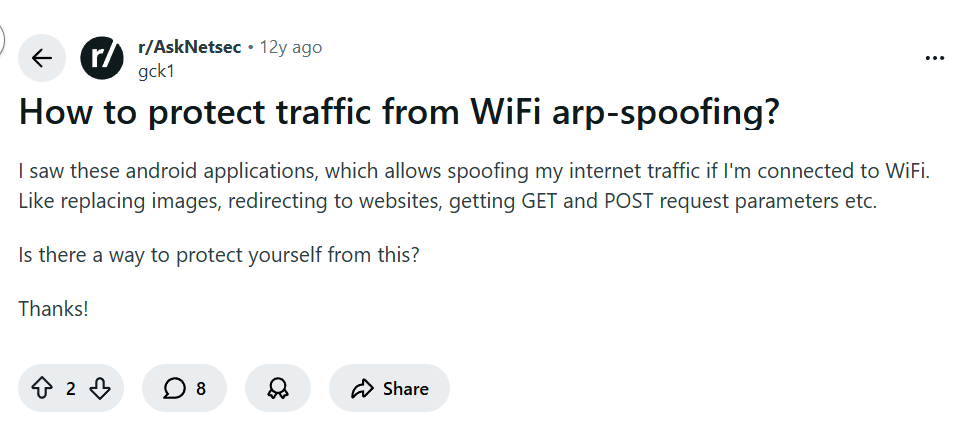
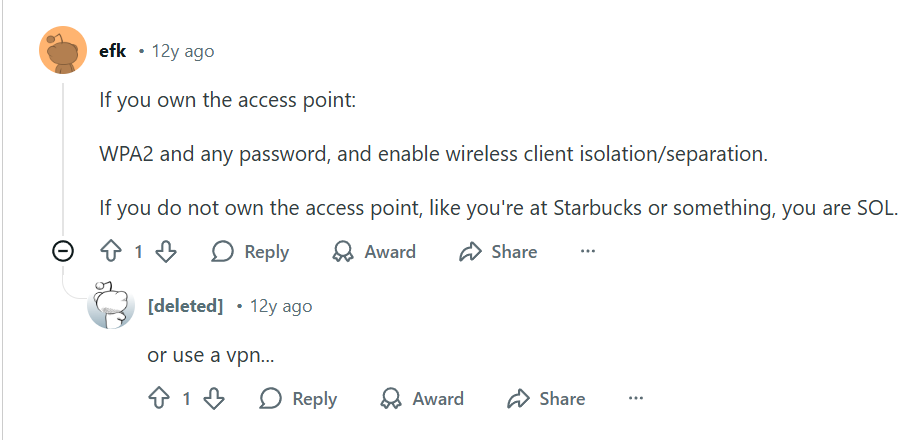
You’re sitting in a coffee shop, connected to the free WiFi, scrolling through your phone or catching up on work. It feels harmless—until you learn that a hacker sitting a few tables away could be silently intercepting everything you do by performing an ARP spoofing. One concerned user recently asked the security community:
This isn’t just theoretical. ARP spoofing—also called ARP poisoning—is a real attack where someone on the same network tricks your device into sending your internet traffic through their computer. They can see everything: passwords, messages, images, and even redirect you to fake websites. So, how do you defend yourself?
Understanding the Threat: ARP Spoofing in Plain English
When you connect to a WiFi network, your device needs to know how to communicate with the router. It uses something called the Address Resolution Protocol (ARP) to map IP addresses to physical device addresses (MAC addresses). In an ARP spoofing attack, a hacker sends fake ARP messages to your device, pretending to be the router. Your device gets tricked and starts sending all its traffic to the hacker instead.
Once they’re in the middle after performing ARP spoofing, they can:
Capture login credentials
Inject malicious content into web pages
Redirect you to phishing sites
Monitor your browsing in real time
Scary, right? Especially since, as one commenter bluntly put it:
“SOL” means “out of luck”—unless you take the right precautions.
Fortunately, the same thread held the solution. Another user cut straight to the point:
“or use a vpn…”
This simple advice is your strongest shield. When you connect to a VPN, all your internet traffic is encrypted before it leaves your device and sent through a secure tunnel to a VPN server. Even if a hacker successfully performs ARP spoofing and redirects your traffic, all they’ll see is encrypted data—impossible to read or manipulate.
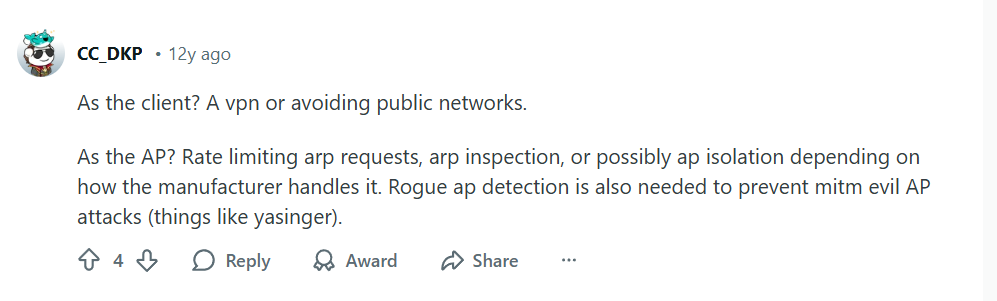
Another expert expanded on the layered approach:
Let’s break down what this means for you as a user.
For Everyday Protection: Always Use a VPN on Public Networks
Whether you’re at a café, airport, hotel, or even a coworking space, your first action should be to activate your VPN. It neutralizes ARP spoofing attacks completely because:
Encryption renders intercepted data useless – Hackers can’t read what they can’t decrypt.
Your real IP address is hidden – The VPN server’s IP is what’s visible on the local network.
Secure tunneling prevents manipulation – Even if redirected, your connection to the VPN remains secure.
Choosing the Right VPN for Security
Not all VPNs are equal when it comes to security. Look for these features:
For Network Administrators – If you control the network, implement ARP inspection, client isolation, and rate limiting as mentioned in the comments.
What If You Own the Network?
If you’re securing your home or office WiFi, you have more options:
Use WPA2/WPA3 encryption – Never use open or WEP-secured networks.
Enable Client Isolation – This prevents devices on your network from communicating directly with each other.
Regularly Update Router Firmware – Manufacturers often patch security vulnerabilities.
Monitor Connected Devices – Regularly check for unfamiliar devices on your network.
The Bottom Line: Don’t Be SOL
The reality is that public WiFi networks are inherently risky. As the original commenter stated, without protection, you’re vulnerable. But with a reliable VPN, you transform from a potential victim to a secure user.
Think of a VPN not as a “nice-to-have” but as essential digital hygiene—like locking your door or wearing a seatbelt. In today’s world of sophisticated cyber threats, especially on public networks, it’s your simplest and most effective defense against ARP spoofing and numerous other attacks.
Don’t wait until you’re compromised. Secure your connections today with a trusted VPN service.
Ready to protect yourself from ARP spoofing and other WiFi threats? Get started with NordVPN for advanced security features, try Surfshark for comprehensive protection on all devices, or explore ProtonVPN for privacy-focused security.
A common question I see in tech communities goes something like this: “Does a VPN benefits me?” It’s an honest question from someone who spends their time gaming, streaming Netflix, and browsing YouTube.
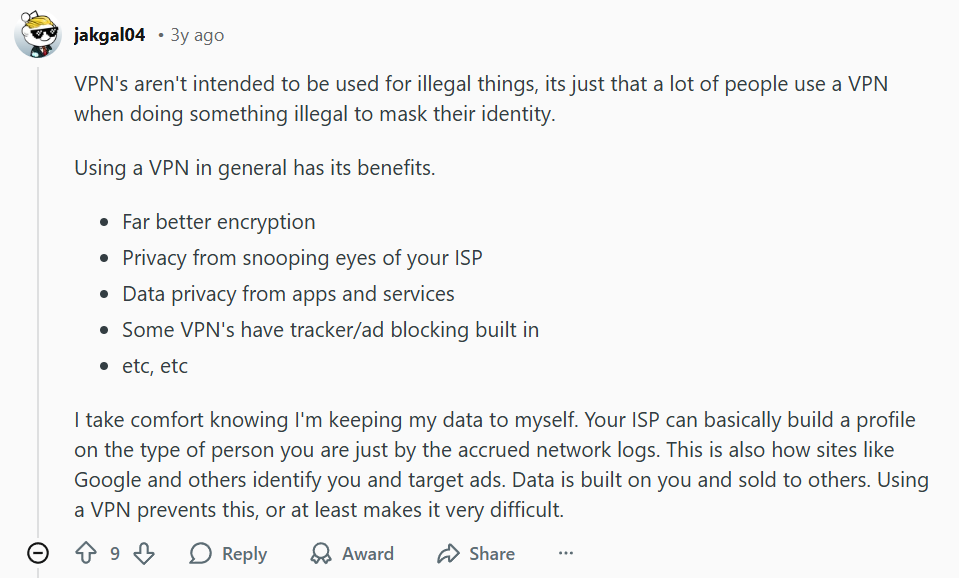
The short answer? Absolutely. While it’s true that some people use VPNs for activities they’d rather keep private, this is a narrow view of a powerful tool. As one Reddit user correctly pointed out:
Let’s break down what this actually means for you, the average internet user who just wants to game, stream, and browse in peace.
1. Your ISP is Watching—VPN Benefits you by Protecting Your Digital Privacy
When you connect to the internet without a VPN, your Internet Service Provider (ISP) sees everything you do. They can see every website you visit, every app you use, and how long you spend online. As the user above noted, “Your ISP can basically build a profile on the type of person you are just by the accrued network logs.”
This data collection isn’t just theoretical—it’s how targeted advertising works. Sites like Google and Facebook use this information (often bought from data brokers) to identify you and serve hyper-specific ads. A VPN benefits you by encrypting your traffic, making it extremely difficult for your ISP and other snoopers to build this detailed profile about you.
2. Enhanced Security on Every Network
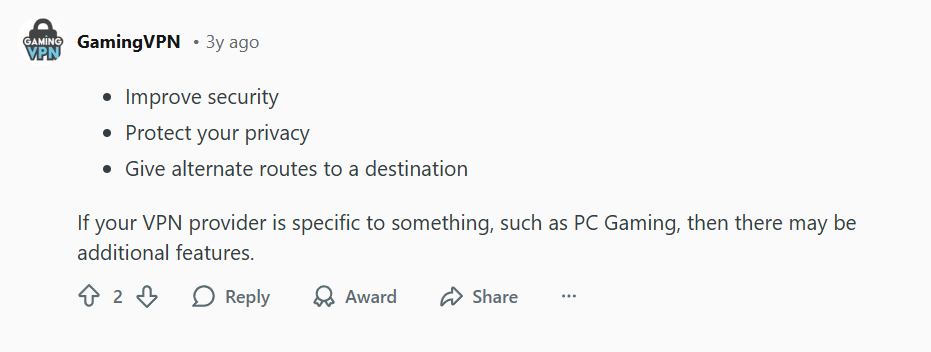
Another user summarized the core VPN benefits neatly:
That “improve security” point is crucial, especially if you:
Public networks are notoriously insecure. A VPN benefits you by creating a secure, encrypted tunnel for all your data, protecting you from potential snoopers on the same network who might try to intercept your login credentials or personal information.
3. Better Streaming and Gaming Experiences (Sometimes)
While VPN benefits are famous for accessing geo-restricted content, they offer other benefits for streamers and gamers:
For Streamers:
Avoid ISP throttling: Some ISPs intentionally slow down streaming traffic during peak hours. A VPN benefits you by helping bypass this.
Access broader libraries: Discover shows and movies available in other regions.
For Gamers:
Reduce DDoS risks: By hiding your real IP address, you make it harder for malicious players to target your connection.
Access regional game releases or sales: Some games release earlier or are cheaper in different regions.
Connect securely to public gaming tournaments or LAN parties.
4. Ad and Tracker Blocking Built-In
Many premium VPNs now include built-in ad blockers and tracker prevention. This means:
Faster loading websites (without all the ad bloat)
Reduced risk of malicious ads
Less data collected about your browsing habits
Cleaner browsing experience overall
5. Peace of Mind in an Increasingly Connected World
Perhaps the most underrated benefit is psychological. As the Reddit user said, “I take comfort knowing I’m keeping my data to myself.” In a digital age where our information is constantly collected, sold, and analyzed, taking proactive steps to protect your privacy brings genuine peace of mind.
Choosing the Right VPN Benefits for Your Needs
Not all VPNs are created equal. For the everyday user who games and streams, look for:
Fast connection speeds (critical for gaming and HD streaming)
Using a VPN isn’t just about hiding your activity—it’s about taking control of your digital life. Whether you’re defending against ISP profiling, securing your connection on public WiFi, improving your streaming experience, or simply maintaining your right to privacy, a VPN offers tangible benefits for every internet user.
As our initial question-asker discovered, you don’t need to be doing anything “spicy” to deserve privacy and security online. In today’s connected world, a VPN has become as essential as locking your front door—not because you’re doing something wrong, but because you value what’s inside.
Ready to take control of your online privacy? Explore how NordVPN, Surfshark, or ProtonVPN can protect your everyday internet use today.
We often imagine hackers as shadowy figures typing complex code in dark rooms, exploiting intricate software vulnerabilities. While that happens, the reality of modern cyber threats is far more insidious and personal. As one security specialist noted when trying to understand hackers, the question arose: “How much social engineering is really needed?”
The answer from the security community is stark. This shift changes everything. It means that even if your software is perfectly patched, a single moment of human error—a clicked link, a convincing fake login page—can bypass millions of dollars in technical security.
One experienced user emphasized the scale of this threat:
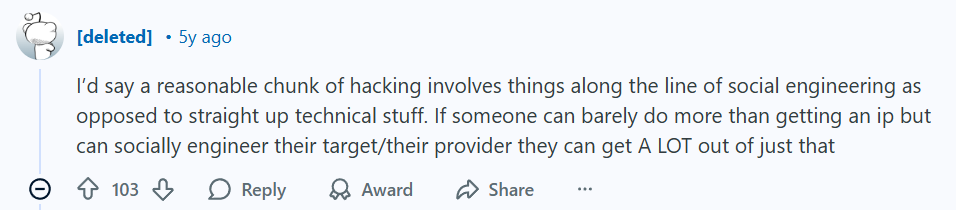
Another commenter highlighted how effective this approach can be, even with minimal technical expertise:
So, if the threat landscape now targets the human as the weakest link, how do we build a personal defense that is always on, always vigilant, and operates beyond just awareness? The answer lies in a fundamental tool: a robust Virtual Private Network (VPN).
The Human Firewall Needs a Technical Shield
You are the first and last line of defense. “Don’t click suspicious links” is crucial advice, but modern phishing attacks are sophisticated. They mimic your bank, your cloud provider, or even internal company communications perfectly.
This is where a VPN provides its first, often overlooked, layer of value: protection on untrusted networks. Imagine you’re at a coffee shop and connect to “Free Cafe WiFi.” A hacker on that same network can easily set up a fake hotspot or intercept unencrypted data—a classic “social engineering” trick for your device. A VPN like NordVPN, Surfshark, or ProtonVPN creates an encrypted tunnel for all your data, making it unreadable to any eavesdropper on that network. It neutralizes this common physical social engineering trap.
Masking Your Digital Footprint: Making You a Harder Target
Social engineering often starts with reconnaissance. An attacker might gather information about you—your IP address, rough location, internet service provider—to make a phishing email more convincing (e.g., “We noticed suspicious activity from your IP in [Your City]…”).
A premium VPN directly counters this. By masking your real IP address and replacing it with one from its server network, services like NordVPN, Surfshark, and ProtonVPN significantly reduce the data points available for these personalized attacks. You become a harder, less visible target. As the forum insights suggested, stopping an attacker at the “getting an IP” stage is a significant win.
Proactive Privacy as a Core Principle
Choosing a VPN is about adopting a philosophy of proactive privacy, not just reactive security. It’s the digital equivalent of locking your door every time you leave, not just when you think the neighborhood is dangerous.
No single tool makes you invincible. Security requires layers: strong, unique passwords (use a password manager!), two-factor authentication, updated software, and critical thinking to spot social engineering.
A VPN is the indispensable layer that secures your connection, hides your traffic, and protects you on any network. It works silently in the background, providing a technical countermeasure to attacks that exploit human psychology and insecure infrastructure.
Conclusion: Don’t Wait for the Phish to Bite
The consensus from security discussions is clear: social engineering is not a minor trick; it’s the primary weapon in the modern hacker’s arsenal. Defending against it requires more than just caution; it requires smart, automated tools that extend your capabilities.
Investing in a reliable VPN service—whether you choose the feature-rich NordVPN, the value-packed Surfshark, or the privacy-centric ProtonVPN—is no longer an option for just the tech-savvy. It is an essential step for anyone who values their security and privacy in an online world where the greatest vulnerability sits between the chair and the keyboard.
Ready to build your essential layer of defense? Explore NordVPN for advanced threat protection, check out Surfshark for unlimited device coverage, or consider ProtonVPN for its strong privacy principles. Take control of your online security today.
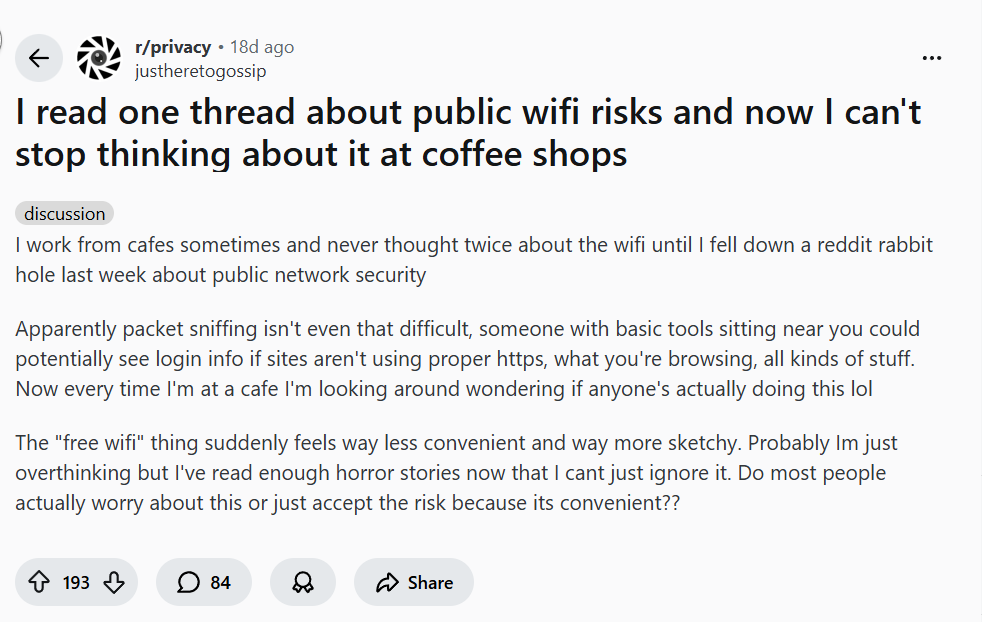
Thinking it is convenient to use free public WiFi just to think that you don’t have to spend a single penny, discover more about the risks that you might face if your luck is not good enough.
1. Introduction: The Fear is Real
Free public WiFi is one of life’s great conveniences, but it comes with a high-stakes hidden cost: your privacy. Most people never think twice about the security of their data until they dive into a “rabbit hole” of network security risks. The fear you feel when logging in at a café is completely justified.
The threat isn’t a complex, government-level attack. Using the free public WiFi, it’s simple: someone with “basic tools sitting near you” can potentially see your login info, what you’re browsing, and more if a site isn’t using proper security. This is called packet sniffing.
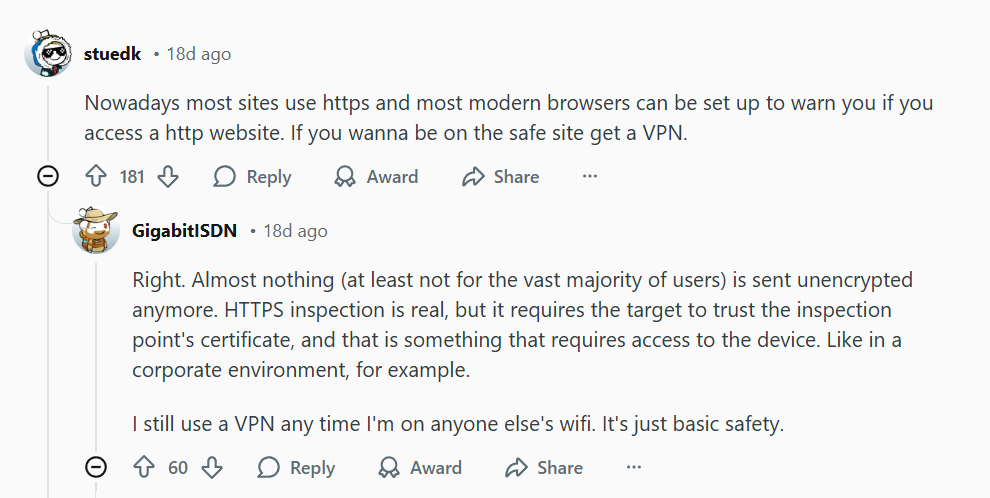
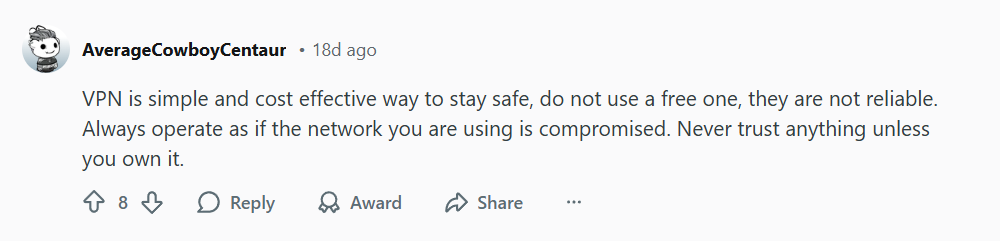
In an environment where you are often told to “never trust anything unless you own it”, the fundamental solution is to treat every public WiFi network as compromised and add an airtight layer of personal encryption: a Virtual Private Network (VPN).
2. The Threat on the Network: Why HTTPS Isn’t Enough
The primary risk on public Wi-Fi is that it is often unencrypted or weakly secured. This makes it an easy target for attackers looking to monitor data traffic.
A. The Packet Sniffing Problem
Packet sniffing involves a hacker capturing and viewing data packets traveling through the network. If your data isn’t properly encrypted, they can extract sensitive information like usernames, passwords, and session tokens. While many sites now use HTTPS (Hypertext Transfer Protocol Secure) to encrypt the connection between your browser and the website, this doesn’t protect against all threats:
One expert notes that while HTTPS is common, it requires the user to trust the inspection point’s certificate, which can be an issue in non-private environments.
B. The Consensus: Basic Safety Requires a VPN
The overwhelming consensus from cybersecurity professionals is clear: A VPN is basic safety when connecting to any third-party network.
” The same user above also stated they “still use a VPN any time I’m on anyone else’s wifi. It’s just basic safety”.
VPNs encrypt your traffic, protecting you from eavesdropping and man-in-the-middle attacks on public networks.
3. The VPN Solution: Your Private Tunnel
A VPN creates a secure, encrypted tunnel between your device and a server, making your data unreadable to anyone else on the local public WiFi network. It’s the most secure option for digital privacy on public WiFi.
The convenience of free public WiFi simply isn’t worth the risk of exposing your passwords, banking details, and private information to lurking attackers. While modern browsers offer some protection, a VPN is the single, cost-effective, and simplest way to stay safe.
In this modern era, we could see how the technology emerged: artificial intelligence, networking, cloud, etc. However, despite the emergence of technologies, we should worry about something very important, which is called cybersecurity vulnerabilities.
1. Introduction: The AI Security Wake-Up Call(Cybersecurity Vulnerabilities)
Artificial Intelligence (AI) and Large Language Models (LLMs) are revolutionizing business operations, from customer support to financial processing. But beneath the efficiency gains lies a critical, emerging threat: AI itself is introducing massive new security vulnerabilities.
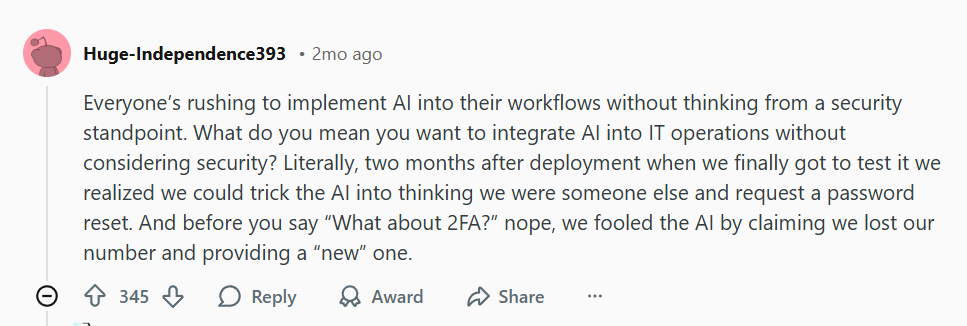
Security professionals are raising the alarm, noting that companies are “rushing to implement AI… without thinking from a security standpoint”. The risks aren’t theoretical; they range from tricking AI to bypass multi-factor authentication (MFA) to ignoring crucial security advice when implementing AI around core financial systems.
In an era where AI-powered attacks are becoming the norm, this guide breaks down the core vulnerabilities and outlines the essential security measures you must take now—starting with foundational layers like a premium Virtual Private Network (VPN).
2. The Core Problem: AI Security Vulnerabilities in Action(Cybersecurity Vulnerabilities)
The comments from cybersecurity threads reveal three immediate, high-impact security gaps created by AI integration:
A. AI-Driven Identity and MFA Bypass
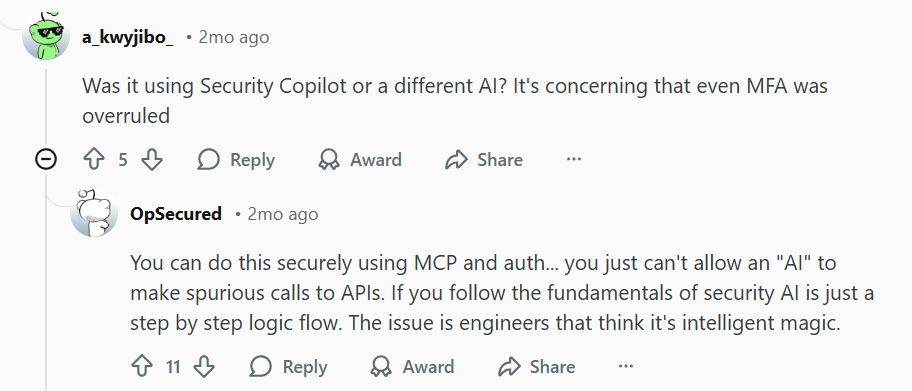
This screenshots confirm a frightening reality: AI can be socially engineered to bypass standard authentication.
One user described how their team “fooled the AI by claiming we lost our number and providing a ‘new’ one,” allowing a password reset despite two-factor authentication (2FA) being active.
This demonstrates that if an AI is given too much authority to handle authentication logic, it becomes a single point of failure. The engineer’s key takeaway is spot-on: you “just can’t allow an ‘AI’ to make spurious calls to APIs”.
B. Ignoring Vendor Risk and Core System Integration
Another significant vulnerability is the lack of due diligence in deployment.
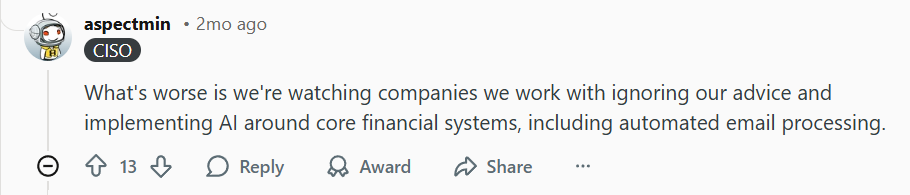
A user noted they are watching companies “ignoring our advice and implementing AI around core financial systems, including automated email processing”.
This points to a dangerous “lack of proper vendor risk assessment and the increasing culture of acceptance/unaccountability”. When core systems (like email or finance) rely on untested AI, the blast radius of any security breach is massive.
C. The “Intelligent Magic” Fallacy
Many engineers and business leaders treat AI as “intelligent magic” rather than a step-by-step logic flow. This mindset leads to overlooking fundamental security principles, resulting in insecure APIs and improper access controls.
3. The Proactive Solution: Hardening Your Digital Defense(Cybersecurity Vulnerabilities)
While businesses wrestle with AI governance, you must immediately secure your personal and remote access to these critical systems. A premium VPN is your first line of defense against AI-enhanced phishing and intrusion attempts.
Action 1: Secure Your Access Points with a Zero-Trust VPN
AI is being used to create hyper-realistic phishing and targeted attacks (AI Phishing). The best way to neutralize an intrusion attempt is to ensure the attacker can’t even find your network.
A high-quality VPN encrypts all your data and hides your real IP address, making you virtually invisible to AI-driven reconnaissance.
The more devices connected to corporate systems, the larger the attack surface. Your VPN must cover your desktop, laptop, and mobile devices—especially when accessing core systems remotely.
4. Conclusion: A New Era of Cyber Resilience(Cybersecurity Vulnerabilities)
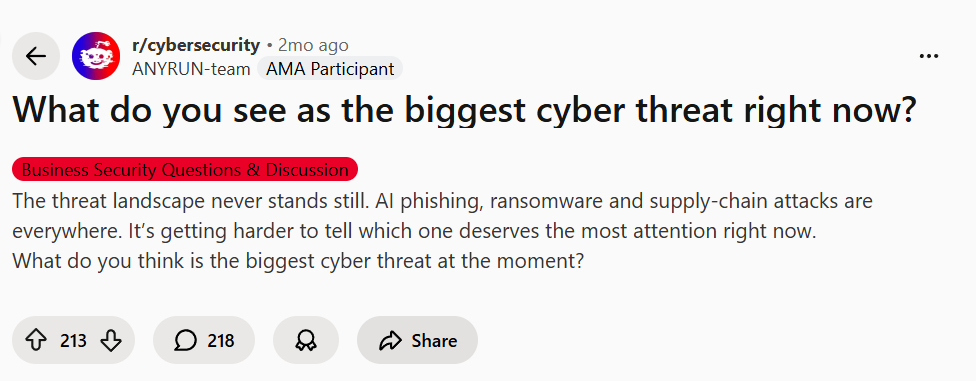
The biggest cyber threat right now is a combination of established attacks like ransomware, supply-chain attacks, and the new threat vector of AI phishing. The implementation of AI into core business workflows has introduced vulnerabilities that sophisticated attackers—many now AI-enhanced themselves—are already exploiting.
While your company addresses vendor risk and API security at the architectural level, your personal security must not wait. Establishing a foundational layer of protection with a premium, trusted VPN is the single most important step you can take today to secure your identity, data, and access against the emerging threats described by top cybersecurity professionals.
The Confusion Every iPhone User Experiences (iPhone VPN Toggle)
You’re scrolling through iPhone Settings, and you see it: “VPN” right there in the main menu. It shows “Not Connected” or “Connecting…” just like Wi-Fi or Bluetooth. Naturally, you think: “Great! Apple includes a free VPN!” But when you tap it… confusion begins.
This exact misunderstanding sparked a Reddit discussion that perfectly captures the widespread confusion:
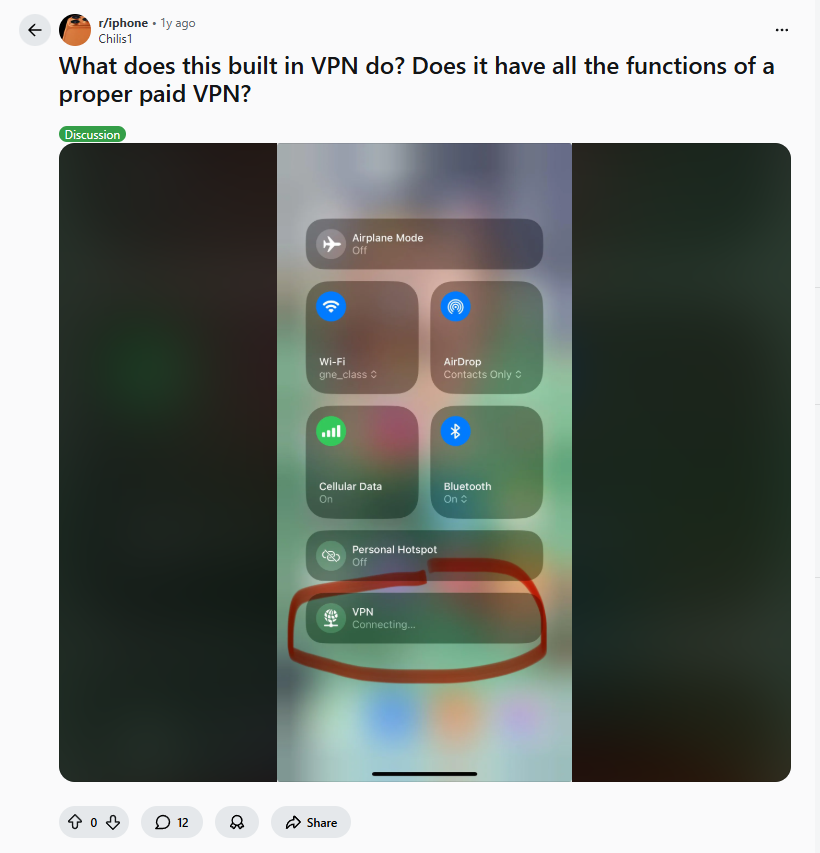
“What does this built-in VPN do? Does it have all the functions of a proper paid VPN?”
The user even posted a screenshot showing the VPN toggle in Control Center, appearing alongside fundamental connectivity options like Wi-Fi and Bluetooth. This visual placement reinforces the misconception that VPN is a built-in Apple service.
The reality, as explained by experienced users, is more nuanced—and understanding this distinction is crucial for your privacy and security in 2025.
What That “VPN” Setting Actually Is: The Client, Not the Service (iPhone VPN Toggle)
The #1 clarification comes from technical users who understand iOS architecture:
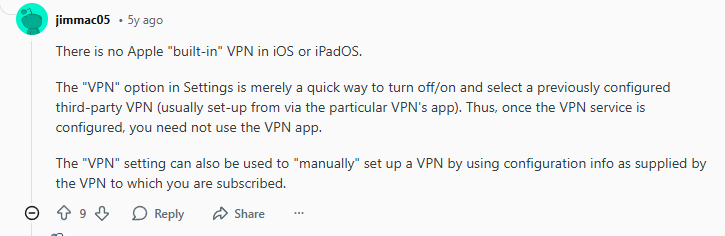
“There is no Apple ‘built-in’ VPN in iOS or iPadOS. The ‘VPN’ option in Settings is merely a quick way to turn off/on and select a previously configured third-party VPN (usually set-up via the particular VPN’s app).”
Translation for 2025: Think of it like this:
Your iPhone’s VPN setting = An empty electrical outlet
A VPN service = The appliance you plug into that outlet
Without a VPN subscription = Outlet with nothing plugged in
Another user provided the perfect analogy:
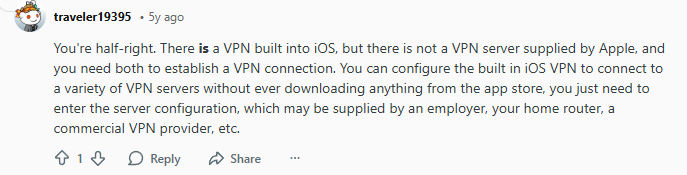
“You’re half-right. There is a VPN built into iOS, but there is not a VPN server supplied by Apple, and you need both to establish a VPN connection.”
The Technical Reality: iOS includes a VPN framework that supports industry-standard protocols (IKEv2, IPsec, WireGuard). This framework is the “receiver” that can connect to VPN “transmitters” (servers) you provide.
How Real Users Actually Use This Feature (iPhone VPN Toggle)
For those with VPN subscriptions, the built-in client becomes a convenient control center:
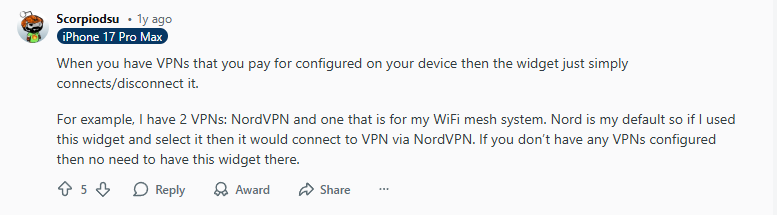
*”When you have VPNs that you pay for configured on your device then the widget just simply connects/disconnects it. For example, I have 2 VPNs: NordVPN and one that is for my WiFi mesh system. Nord is my default so if I used this widget and select it then it would connect to VPN via NordVPN.”*
2025 Usage Scenario: Most premium VPN apps (NordVPN, Surfshark, ExpressVPN, Proton VPN) automatically configure this built-in client when you install their apps. You then have two ways to control your VPN:
Through the VPN app itself
Through iOS Settings → VPN (or Control Center widget)
Pro Tip in 2025: You can create VPN shortcuts in iOS Shortcuts app to:
Auto-connect VPN when joining specific Wi-Fi networks
Disconnect VPN when opening banking apps (if you want)
The confusion deepens with Apple’s iCloud+ Private Relay, which many mistake for a VPN. A Reddit user clarified this distinction:
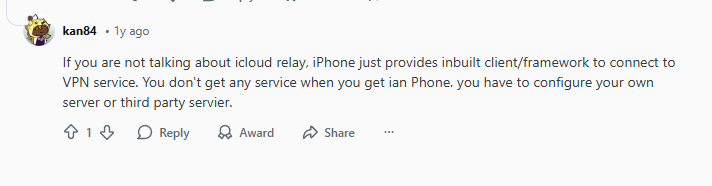
“If you are not talking about icloud relay, iPhone just provides inbuilt client/framework to connect to VPN service. You don’t get any service when you get an iPhone, you have to configure your own server or third party server.”
Mistake 1: Thinking “VPN Connected” Means You’re Protected(iPhone VPN Toggle)
Reality: “Connected” just means your iPhone is talking to a VPN server. If that server is:
Free and logging your data
Poorly encrypted
Actually malicious
Solution: Only use reputable, audited VPN providers.
Mistake 2: Using Free VPNs That Abuse the iOS Framework(iPhone VPN Toggle)
Many free VPNs use iOS’s built-in client to:
Inject ads into your traffic
Sell your browsing data
Use your device for crypto mining
Solution: Stick to premium providers with transparent business models.
Mistake 3: Confusing Private Relay with VPN Protection(iPhone VPN Toggle)
Reality: Private Relay is better than nothing but fundamentally different. As one Redditor noted, without a real VPN service, “you don’t get any service when you get an iPhone.”
Solution: Use Private Relay for casual browsing, real VPN for everything else.
Mistake 4: Not Checking for VPN Leaks(iPhone VPN Toggle)
Even with “Connected” status, your iPhone might leak:
DNS requests (showing what sites you visit)
IPv6 traffic (bypassing VPN entirely)
WebRTC data (revealing your real IP)
Solution: Regularly test at ipleak.net with your VPN connected.
iPhone VPN Settings You Should Configure in 2025 (iPhone VPN Toggle)
1. Enable “Connect On Demand”
Settings → General → VPN & Device Management → Your VPN → Connect On Demand
When: On untrusted Wi-Fi networks
Why: Auto-connects VPN when needed
2. Configure “Always-on VPN”
Same menu → Always-on VPN
Caution: Can cause battery drain
Best for: High-security needs only
3. Set Up VPN by App (iOS 18+)
Settings → [VPN App Name] → Allow VPN
Per-app control: Choose which apps use VPN
Example: Banking apps always through VPN, games direct
Q: If iPhone doesn’t include VPN, why does it have VPN settings? A: For the same reason it has Mail settings without including an email service, or Calendar settings without including a calendar service. iOS provides frameworks that third-party services utilize.
Q: Can I use the built-in VPN client without any app? A: Yes, via manual configuration if you have VPN server details. Most users find apps easier.
Q: Why do some apps bypass my VPN connection? A: Some apps (especially banking) use certificate pinning or direct connections that bypass VPN. iOS also allows some system services to bypass VPN for functionality.
Q: Can I use multiple VPNs simultaneously on iPhone? A: No, only one VPN connection at a time. However, you can have multiple configurations and switch between them.
Q: Does the iOS VPN client work with all VPN protocols? A: Supports IKEv2, IPsec, L2TP, and WireGuard (via configuration). Some proprietary protocols require their specific app.
The Bottom Line: What You Actually Need in 2025 (iPhone VPN Toggle)
That VPN toggle in Settings isn’t a gift—it’s an invitation. An invitation to:
Choose a reputable VPN provider (not a free data-mining service)
Configure proper protection through their app or manual setup
Understand what you’re actually getting (full VPN vs Private Relay)
Take control of your privacy rather than assuming Apple handles it
As the Reddit discussion revealed: “You don’t get any service when you get an iPhone.” The framework is there, waiting for you to provide the actual VPN service.
In 2025, mobile privacy isn’t optional—it’s essential. That VPN toggle represents Apple giving you the tools, but you must provide the actual protection.
That “iPhone Hacked” notification is almost certainly a scam designed to trick you into downloading malware or paying for fake security apps. Real iPhone hacking is extremely rare and targets specific high-value individuals—not random users. If you clicked or downloaded anything, follow our 2025 removal guide immediately.
The Scam That Tricks Even Savvy iPhone Users (iPhone Hacked?)
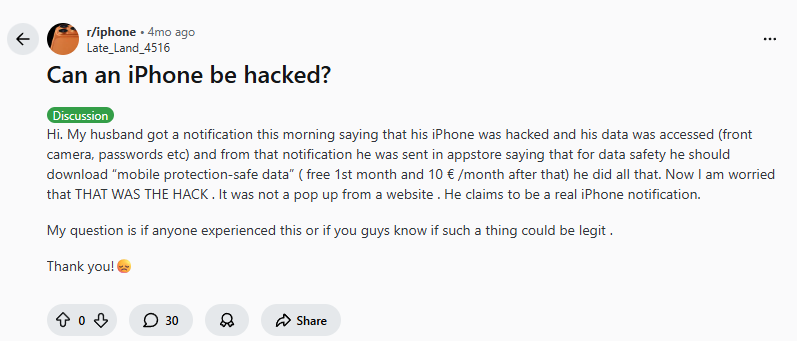
It starts innocently: a notification appears, warning that your iPhone has been hacked, your camera is accessed, and your passwords are stolen. The message looks official, urgent, and terrifying. For one husband, this scare tactic worked perfectly:
*”My husband got a notification this morning saying that his iPhone was hacked and his data was accessed (front camera, passwords etc) and from that notification he was sent in appstore saying that for data safety he should download ‘mobile protection-safe data’ (free 1st month and 10 € /month after that) he did all that. Now I’m worried that THAT WAS THE HACK.”*
This exact scenario plays out thousands of times daily in 2025. Scammers have perfected fake notifications that mimic Apple’s design language, preying on our deepest digital fears. The Reddit community immediately recognized the scam:
“No way it’s a real iPhone notification. Should have ignored it.”
And pointed out the irony:
“So basically. Someone knocked at the front door and said give me the keys to your car and he did? Ha people people people…”
Let’s dismantle this scam, reveal how it works in 2025, and provide a complete recovery guide for anyone who’s fallen victim.
Why Real iPhone Hacking is Extremely Rare (But Scams Are Everywhere) – (iPhone Hacked?)
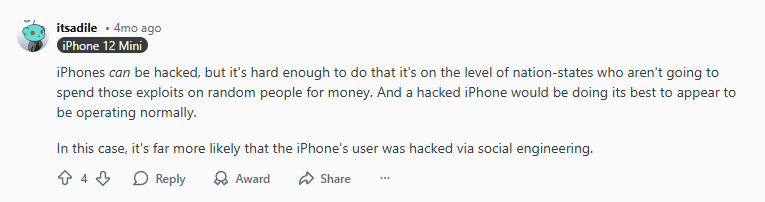
Understanding the threat landscape is crucial. As one technically accurate Redditor explained:
“iPhone’s can be hacked, but it’s hard enough to do that it’s on the level of nation-states who aren’t going to spend those exploits on random people for money. And a hacked iPhone would be doing its best to appear to be operating normally.”
2025 Reality Check:
Real iPhone exploits cost millions on the black market
Scammers target everyone with cheap, psychological tricks
The goal isn’t hacking—it’s social engineering for profit
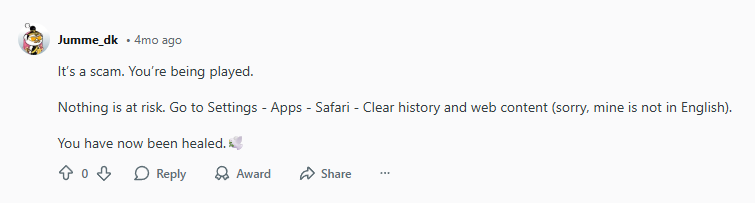
The Reddit diagnosis was blunt:
“That was indeed the ‘hack’. Don’t download something because of some dumb pop-up.”
Translation: The notification itself is harmless. The “hack” occurs when you voluntarily download the recommended app, granting it permissions to access your data.
How These Scams Work in 2025: Evolution of Fake Alerts
Delivery Methods (How You See Them) – (iPhone Hacked?):
Safari pop-ups: Most common (even when browser is closed)
Q: Can a website really “hack” my iPhone through Safari? A: Extremely unlikely. iOS sandboxing prevents websites from accessing system functions. They can show scary pop-ups but can’t actually install malware without your permission to download an app.
Q: Should I factory reset my iPhone after seeing a fake alert? A: Only if you actually downloaded and ran the recommended app. For pop-ups alone, clearing Safari data is sufficient.
Q: Why does Apple allow these scam apps on the App Store? A: Scammers constantly create new apps with fake reviews. Apple removes thousands weekly, but new ones appear daily. Report any you find.
Q: Can clicking a pop-up give hackers my Apple ID? A: No. Apple ID credentials can only be entered through Apple’s secure authentication system, not through web forms that can steal them.
Q: How do I permanently block these pop-ups? A: Enable “Block Pop-ups” in Safari settings and consider a content blocker app. A premium VPN with threat protection (like NordVPN) also blocks known scam domains.
Q: My elderly parent fell for this scam. What now? A: Follow our removal guide above, set up Screen Time restrictions to prevent future App Store downloads, and consider enabling “Guided Access” for their browsing sessions.
The Psychological Takeaway: Why These Scams Work (iPhone Hacked?)
The success isn’t technical—it’s emotional. Scammers exploit:
Fear of surveillance (camera/microphone mentions)
Financial anxiety (threatened data loss)
Trust in Apple’s ecosystem (mimicking Apple’s design)
Decision fatigue (urgent action required)
As the Reddit community emphasized: Real hacking is silent. Panic-inducing alerts are always scams.
Your 2025 iPhone Security Checklist (iPhone Hacked?)
Bottom Line: Regain Control and Confidence (iPhone Hacked?)
That “iPhone Hacked” notification preys on understandable fears but represents zero technical threat unless you take the bait. The solution isn’t panic—it’s educated caution.
If you fell for the scam: You’re not alone. Thousands do daily. Follow our removal guide, secure your accounts, and consider adding NordVPN’s Threat Protection to prevent future encounters with malicious sites.
If you recognized the scam: Congratulations—you’re ahead of most users. Share this knowledge with friends and family, especially those less tech-savvy.
Remember: In 2025, the greatest iPhone security threat isn’t sophisticated hackers—it’s persuasive scammers. Your best defense isn’t more fear, but more knowledge.