Quick Answer: Does VPN slowing your internet?
If you’ve ever fired up your VPN expecting secure browsing only to watch your internet speed crawl to a halt, you’re not alone. It’s one of the most common frustrations with VPNs. One user recently voiced this exact pain point:

Going from 900 Mbps to 28 Mbps is more than an annoyance—it can make streaming, gaming, or even basic browsing feel impossible. So, is this just the price of privacy? Or can you actually have both speed and security? Let’s break down the causes and solutions, with insights from real users and networking experts.
Why Does a VPN Slowing Your Internet?
A VPN adds several steps to your connection: your data is encrypted, sent to a VPN server, decrypted, and then sent to its final destination. This process, while essential for privacy, introduces potential bottlenecks. A technical user on Reddit explained the encryption overhead clearly:
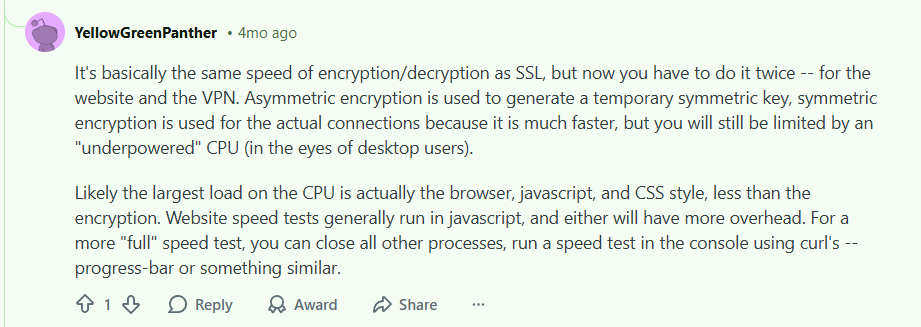
The key takeaway is that some speed loss is normal due to encryption, but a drastic drop (like 95%+) usually points to a specific, fixable issue—not just the inherent cost of security.
The Practical Fixes for VPN Slowing Your Internet: What Actually Work
When the Reddit community crowdsourced solutions for slow VPN speeds, the advice was consistently practical. The most common and effective fixes are all about optimizing your connection path.
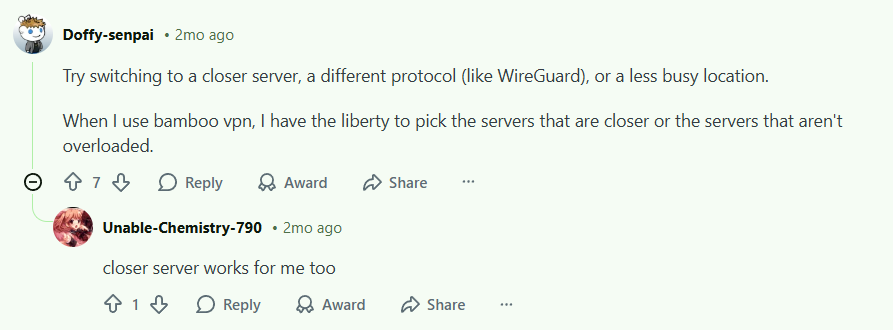
Let’s expand on these proven strategies:
1. Connect to a Closer Server
This is the number one rule for VPN speed. Data traveling a shorter physical distance will naturally arrive faster.
- Action: In your VPN app, manually select a server in your country or a neighboring one.
- Pro Tip: Avoid automatically connecting to “fastest server.” Often, it chooses a heavily loaded one. Pick a city-specific server for more consistent results.
2. Switch to a Modern Protocol (WireGuard)
Not all encryption protocols are created equal. Older protocols like OpenVPN are robust but can be slower.
- Action: Go into your VPN settings and switch your protocol to WireGuard or Lightway (if available).
- Why it works: WireGuard is a newer, leaner protocol designed for both high security and high speed. It’s a game-changer for performance.
3. Avoid Overloaded Servers
A VPN server is shared by many users. If you’re on a crowded server, you’re competing for bandwidth.
- Action: Use a VPN that shows server load percentages or user counts. Choose servers with lower load.
- Signs of overload: consistently slow speeds at all times of day, not just peak hours.
Beyond the Basics: Advanced Troubleshooting for VPN Slowing Your Internet
If you’ve tried the steps above and are still facing a slowdown, consider these less common culprits:
- Your Base Internet Connection: Run a speed test without the VPN. If your base ISP speed is low, a VPN will only make it worse.
- Device Limitations: Older routers or devices with weak CPUs can struggle with encryption overhead.
- Background Apps: As the expert mentioned, your browser and other apps use significant resources. Close unnecessary programs before running a speed test or demanding task.
- VPN Provider Limits: Some budget or free VPNs intentionally throttle speeds to manage bandwidth costs.
Choosing a VPN Built for Speed
The truth is, not all VPNs are equal when it comes to performance. A premium VPN minimizes speed loss through:
- A large, global server network (more options to find a fast, close server)
- Investment in high-bandwidth infrastructure
- Modern protocols like WireGuard by default
- Tools to help you pick the best server
When slow speeds are a deal-breaker, your choice of provider matters most.
Recommended VPNs for Minimizing Speed Loss
Based on the need for close servers, modern protocols, and reliable infrastructure, here are top performers:
- NordVPN: Its NordLynx protocol (built on WireGuard) is consistently ranked as one of the fastest. Their extensive server list makes finding a nearby, low-load server easy.
- Surfshark: Also uses WireGuard and offers a wide network, great for avoiding crowded servers. It’s a strong balance of speed and value.
- ProtonVPN: Known for its strong commitment to privacy without sacrificing performance, offering high-speed servers and secure core architecture for reliable connections.
Final Verdict: You Can Have Speed and Security
A VPN should not cut your speed by 95%. A 10-30% reduction is normal, but a drop into the single-digit percentages signals a fixable problem.
Your action plan:
- Switch your server to one closer to you.
- Change your protocol to WireGuard.
- If problems persist, consider whether your VPN provider itself is the bottleneck.
Don’t accept crippling speeds as the norm. With the right adjustments—and potentially the right VPN service—you can protect your privacy without sacrificing performance.
Ready to experience a faster VPN? Test out a provider built for speed like NordVPN with its NordLynx protocol, or explore the balanced performance of Surfshark. Many offer risk-free trials or money-back guarantees, so you can test the speed impact for yourself.
Leave a Reply