Quick Answer: Is Your iPhone Really Hacked?
That “iPhone Hacked” notification is almost certainly a scam designed to trick you into downloading malware or paying for fake security apps. Real iPhone hacking is extremely rare and targets specific high-value individuals—not random users. If you clicked or downloaded anything, follow our 2025 removal guide immediately.
The Scam That Tricks Even Savvy iPhone Users (iPhone Hacked?)
It starts innocently: a notification appears, warning that your iPhone has been hacked, your camera is accessed, and your passwords are stolen. The message looks official, urgent, and terrifying. For one husband, this scare tactic worked perfectly:
*”My husband got a notification this morning saying that his iPhone was hacked and his data was accessed (front camera, passwords etc) and from that notification he was sent in appstore saying that for data safety he should download ‘mobile protection-safe data’ (free 1st month and 10 € /month after that) he did all that. Now I’m worried that THAT WAS THE HACK.”*
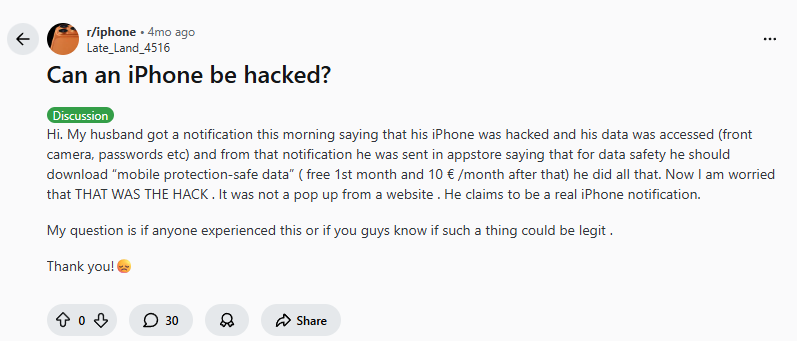
This exact scenario plays out thousands of times daily in 2025. Scammers have perfected fake notifications that mimic Apple’s design language, preying on our deepest digital fears. The Reddit community immediately recognized the scam:
“No way it’s a real iPhone notification. Should have ignored it.”
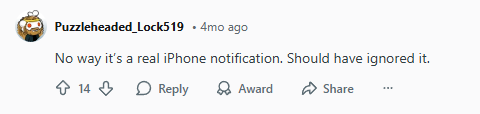
And pointed out the irony:
“So basically. Someone knocked at the front door and said give me the keys to your car and he did? Ha people people people…”

Let’s dismantle this scam, reveal how it works in 2025, and provide a complete recovery guide for anyone who’s fallen victim.
Why Real iPhone Hacking is Extremely Rare (But Scams Are Everywhere) – (iPhone Hacked?)
Understanding the threat landscape is crucial. As one technically accurate Redditor explained:
“iPhone’s can be hacked, but it’s hard enough to do that it’s on the level of nation-states who aren’t going to spend those exploits on random people for money. And a hacked iPhone would be doing its best to appear to be operating normally.”
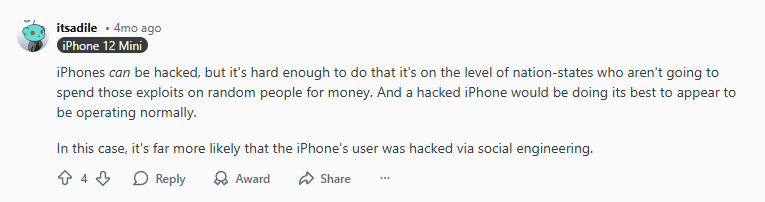
2025 Reality Check:
- Real iPhone exploits cost millions on the black market
- State-sponsored hackers target journalists, activists, executives
- Scammers target everyone with cheap, psychological tricks
- The goal isn’t hacking—it’s social engineering for profit
The Reddit diagnosis was blunt:
“That was indeed the ‘hack’. Don’t download something because of some dumb pop-up.”
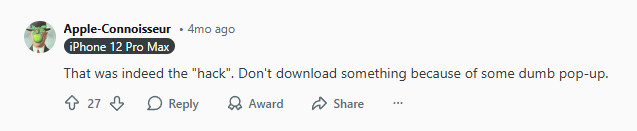
Translation: The notification itself is harmless. The “hack” occurs when you voluntarily download the recommended app, granting it permissions to access your data.
How These Scams Work in 2025: Evolution of Fake Alerts
Delivery Methods (How You See Them) – (iPhone Hacked?):
- Safari pop-ups: Most common (even when browser is closed)
- Fake system notifications: Mimicking iOS design
- Compromised website scripts: Auto-generating alerts
- Malicious ads in legitimate apps: Even in popular games
- Email/SMS links: Leading to fake alert pages
The Psychological Playbook – (iPhone Hacked?):
- Urgency: “Immediate action required”
- Authority: Mimics Apple’s visual language
- Specificity: Mentions cameras, passwords, personal data
- Solution: Offers a “verified” fix
- Social proof: Fake user reviews on App Store page
The Monetization – (iPhone Hacked?):
- Subscription scams: $10-30/month for “protection”
- Data harvesting: App requests full device access
- Credit card theft: Stored payment information
- Ad revenue: Bombards with malicious ads
Immediate Action Guide: If You Clicked or Downloaded
Step 1: Remove the Malicious App (2 Minutes) – (iPhone Hacked?)
- Find the app: Press and hold on home screen
- Tap “Remove App” → “Delete App”
- Don’t just move to App Library—complete deletion is crucial
- Check for related apps: Look for any unfamiliar security/cleaner apps
Step 2: Clear Safari Completely (1 Minute) – (iPhone Hacked?)
As one user provided the essential fix:
“It’s a scam. You’re being played. Nothing is at risk. Go to Settings – Apps – Safari – Clear history and web content… You have now been healed.”
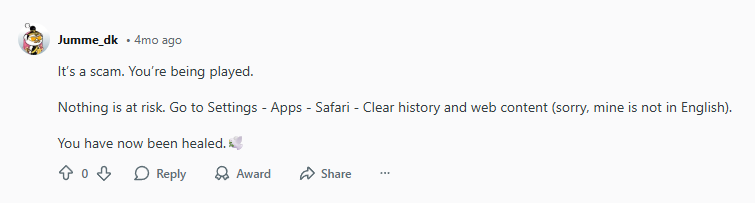
Detailed steps:
- Settings → Safari
- Tap “Clear History and Website Data”
- Confirm “Clear History and Data”
- Go back → “Advanced” → “Website Data”
- Tap “Remove All Website Data”
Step 3: Check Installed Profiles (Critical) – (iPhone Hacked?)
Some scams install configuration profiles:
- Settings → General → VPN & Device Management
- Look for ANY profiles (especially unfamiliar ones)
- Tap profile → “Remove Profile”
- Enter passcode if prompted
Step 4: Review App Permissions (3 Minutes) – (iPhone Hacked?)
Check what recently installed apps accessed:
- Settings → Privacy & Security
- Check each category (Camera, Microphone, Photos, etc.)
- Revoke permissions for any unfamiliar apps
- Pay special attention to “Full Disk Access”
Step 5: Change Critical Passwords (5 Minutes) – (iPhone Hacked?)
Priority order:
- Apple ID password (immediately)
- Email password(s)
- Banking/financial apps
- Social media accounts
- Use unique passwords for each service
How to Spot Fake iPhone Security Alerts in 2025 (iPhone Hacked?)
10 Red Flags of Scam Notifications:
- Urgent language: “Immediate action required,” “Critical alert”
- Camera/microphone mentions: Real iOS doesn’t alert about active sensors
- Download prompts: Apple never directs to App Store for security fixes
- Payment demands: Real security doesn’t require immediate payment
- Poor grammar/spelling: Scammers often make translation errors
- Generic greetings: “Dear iPhone user” instead of your name
- Unusual sender: Check notification source carefully
- Can’t be dismissed: Legitimate alerts can always be closed
- Appears over other apps: Real system notifications don’t overlay apps
- Threatens data loss: “Your data will be deleted in 24 hours”
Real iOS Security Notifications Look Like:
- Appear in Settings app with red badge
- Use formal, calm language
- Never demand immediate payment
- Always verifiable in official Apple support documents
- Don’t create panic about cameras/microphones
Proactive Protection: How to Secure Your iPhone in 2025 (iPhone Hacked?)
Built-in iOS Protections to Enable:
- Lockdown Mode (Settings → Privacy & Security):
- For extreme threats, blocks many attack vectors
- Disables certain website features, message attachments
- Advanced Data Protection (iCloud settings):
- End-to-end encryption for nearly all iCloud data
- Even Apple can’t access your encrypted data
- Stolen Device Protection (Face ID & Passcode):
- Requires Face ID for sensitive actions in unfamiliar locations
- Adds security delay for changing Apple ID password
Essential Third-Party Security Layers:
1. Premium VPN: Your First Line of Defense (iPhone Hacked?)
Why: Blocks malicious sites before they load, encrypts all traffic, prevents drive-by downloads.
Best for blocking scam sites: NordVPN (iPhone Hacked?)
- Threat Protection blocks malicious sites in real-time
- Meshnet for secure device connections
- Consistently prevents access to known scam domains
- NordVPN
- SurfShark
- ProtonVPN
2. Antivirus with Real-Time Protection (iPhone Hacked?)
Why: Scans for malware, detects suspicious app behavior, blocks phishing attempts.
Best for iOS: Malwarebytes (free scan)
- Lightweight, reputable, detects iOS threats
- Real-time protection available in premium version
3. Password Manager (iPhone Hacked?)
Why: Prevents password reuse, generates strong unique passwords, alerts about breaches.
Best for iPhone: 1Password or Bitwarden
- Seamless iOS integration
- Auto-fill without exposing passwords
- Breach monitoring included
What to Do If You Paid the Scammers (iPhone Hacked?)
Immediate Financial Actions:
- Contact your bank: Report fraudulent transaction
- Dispute the charge: Credit card companies typically refund
- Cancel the subscription:
- Settings → [Your Name] → Subscriptions
- Find the scam app → Cancel
- Change payment method: Consider new card if details were stored
Report the Scam:
- Apple: reportphishing@apple.com
- App Store: Report the app (scroll to bottom of app page)
- Report to the specific agencies
- Local authorities: Cybercrime division if significant money lost
Real iPhone Security Threats in 2025 (What Actually Matters) – (iPhone Hacked?)
While scam notifications dominate, these are the real threats:
1. Social Engineering Attacks
- Phishing texts/emails pretending to be Apple
- Fake support calls claiming your iCloud is compromised
- QR code scams redirecting to malicious sites
2. Public Wi-Fi Risks
- Man-in-the-middle attacks intercepting your data
- Fake networks (“Starbucks WiFi Free”)
- Session hijacking on unencrypted connections
3. Physical Access Exploits
- Shoulder surfing your passcode
- Theft and bypass attempts (though iOS 17+ makes this very difficult)
- Malicious chargers (rare but possible)
4. Zero-Day Exploits
- Extremely rare for average users
- Patched quickly by Apple if discovered
- Cost millions on exploit markets
Frequently Asked Questions (2025 Scam Edition) – (iPhone Hacked?)
Q: Can a website really “hack” my iPhone through Safari?
A: Extremely unlikely. iOS sandboxing prevents websites from accessing system functions. They can show scary pop-ups but can’t actually install malware without your permission to download an app.
Q: Should I factory reset my iPhone after seeing a fake alert?
A: Only if you actually downloaded and ran the recommended app. For pop-ups alone, clearing Safari data is sufficient.
Q: Why does Apple allow these scam apps on the App Store?
A: Scammers constantly create new apps with fake reviews. Apple removes thousands weekly, but new ones appear daily. Report any you find.
Q: Can clicking a pop-up give hackers my Apple ID?
A: No. Apple ID credentials can only be entered through Apple’s secure authentication system, not through web forms that can steal them.
Q: How do I permanently block these pop-ups?
A: Enable “Block Pop-ups” in Safari settings and consider a content blocker app. A premium VPN with threat protection (like NordVPN) also blocks known scam domains.
Q: My elderly parent fell for this scam. What now?
A: Follow our removal guide above, set up Screen Time restrictions to prevent future App Store downloads, and consider enabling “Guided Access” for their browsing sessions.
The Psychological Takeaway: Why These Scams Work (iPhone Hacked?)
The success isn’t technical—it’s emotional. Scammers exploit:
- Fear of surveillance (camera/microphone mentions)
- Financial anxiety (threatened data loss)
- Trust in Apple’s ecosystem (mimicking Apple’s design)
- Decision fatigue (urgent action required)
As the Reddit community emphasized: Real hacking is silent. Panic-inducing alerts are always scams.
Your 2025 iPhone Security Checklist (iPhone Hacked?)
Weekly:
- Check installed apps (remove unused/unfamiliar)
- Review app permissions in Settings
- Install iOS updates immediately
Monthly:
- Audit subscriptions (Settings → [Your Name] → Subscriptions)
- Update all apps
- Review privacy report (Settings → Privacy & Security → App Privacy Report)
Immediately if compromised:
- Follow our 5-step removal guide
- Change Apple ID password
- Enable Stolen Device Protection
- Install reputable security tools
Bottom Line: Regain Control and Confidence (iPhone Hacked?)
That “iPhone Hacked” notification preys on understandable fears but represents zero technical threat unless you take the bait. The solution isn’t panic—it’s educated caution.
If you fell for the scam: You’re not alone. Thousands do daily. Follow our removal guide, secure your accounts, and consider adding NordVPN’s Threat Protection to prevent future encounters with malicious sites.
If you recognized the scam: Congratulations—you’re ahead of most users. Share this knowledge with friends and family, especially those less tech-savvy.
Remember: In 2025, the greatest iPhone security threat isn’t sophisticated hackers—it’s persuasive scammers. Your best defense isn’t more fear, but more knowledge.
Also check out our article about iPhone vs Android for banking and how to fix iPhone VPN keep disconnecting.
Leave a Reply