Quick Answer: iPhone vs Android Banking Security
The Banking Security Debate Every Smartphone User Faces (iPhone vs Android)
You’re about to check your balance, transfer money, or pay a bill on your phone. A nagging thought appears: “Is my phone actually safe for this?” If you’re an iPhone user, you’ve probably heard Apple’s security boasts. If you’re on Android, you might wonder if you’re at a disadvantage.
This exact anxiety sparked a Reddit discussion two years ago that remains shockingly relevant today:
“IOS is safer than Android when it comes to privacy and home banking.” Is this a legend? I’ve heard plenty times from Iphone users that IOS is the safest operative system around when it comes to data safety. Plus I use a lot home banking and other money platforms on my devices so this is a primary concern to me.”
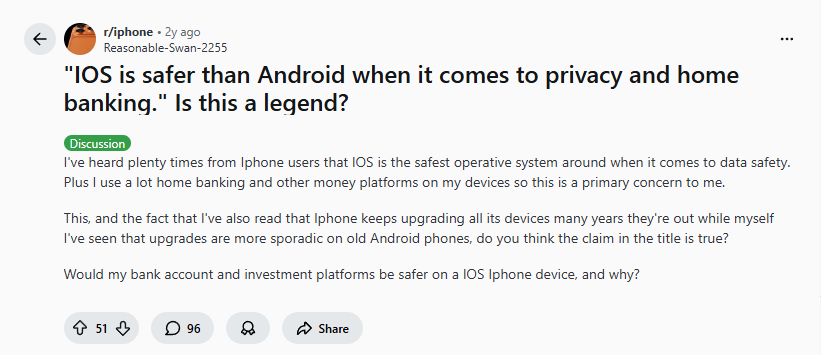
The question attracted nearly 100 comments, revealing divided opinions, technical insights, and one universal truth: Security depends on more than just your operating system.
In 2025, with mobile banking usage up 300% since 2020 and financial apps handling everything from daily transactions to cryptocurrency, this question isn’t academic—it’s critical to your financial safety. Let’s examine what’s changed, what hasn’t, and how to truly protect your money.
The Core Security Difference: Walled Garden vs Open Ecosystem (iPhone vs Android)
The fundamental security distinction between iOS and Android hasn’t changed since 2022, but its implications have deepened with banking app sophistication.
iPhone’s “Walled Garden” Approach
Apple maintains strict control, as one Reddit user explained:
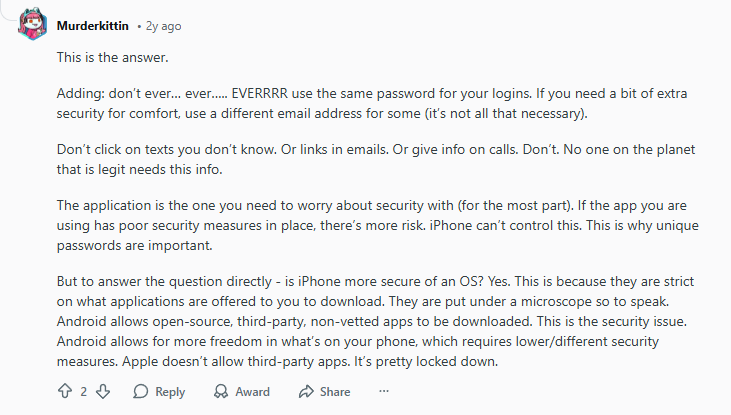
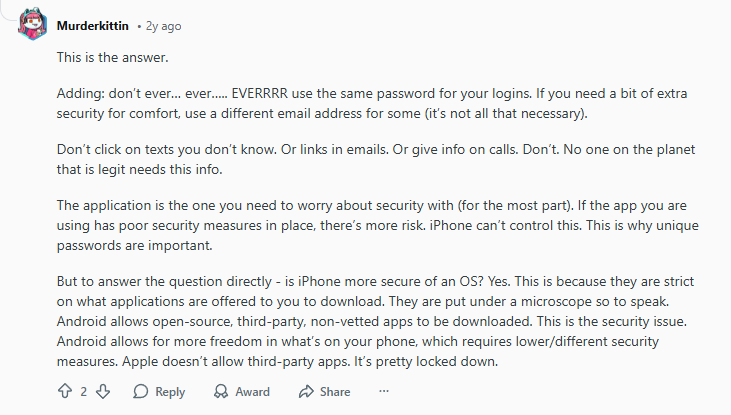
“But to answer the question directly – is iPhone more secure of an OS? Yes. This is because they are strict on what applications are offered to you to download. They are put under a microscope so to speak… Apple doesn’t allow third-party apps. It’s pretty locked down.”
2025 Update: Apple’s walled garden has become even more fortified:
- App Store review process now includes automated security scanning
- Privacy “nutrition labels” require apps to disclose data practices
- App Tracking Transparency limits data sharing between apps
- iOS 18 introduces enhanced lockdown mode for high-risk users
Android’s “Open Ecosystem” Reality
Android offers more freedom—and more responsibility:
“Yes and no – ultimately, at face value and out of the box, both are just as secure. However, because it’s possible to sideload apps and root Android devices, they have the potential to be less secure.”

2025 Update: Google has significantly improved Android security:
- Play Protect now scans 125 billion apps daily
- Google Play Store has tightened developer requirements
- Android 15 introduces enhanced phishing protection
- Security update delivery has improved (though still fragmented)
The Uncomfortable Truth: You’re the Weakest Link (iPhone vs Android)
Both iOS and Android communities agreed on one crucial point—the human factor:
“The fact is that the weakest link is usually the user. Make sure you use a secure password, always use MFA if available, and don’t fall for phishing scams.”

This wisdom from 2022 remains the #1 security principle in 2025. No operating system can protect you from:
- Reusing passwords across accounts
- Clicking phishing links in emails/texts
- Downloading fake banking apps
- Using public Wi-Fi without protection
Another user emphasized password hygiene:
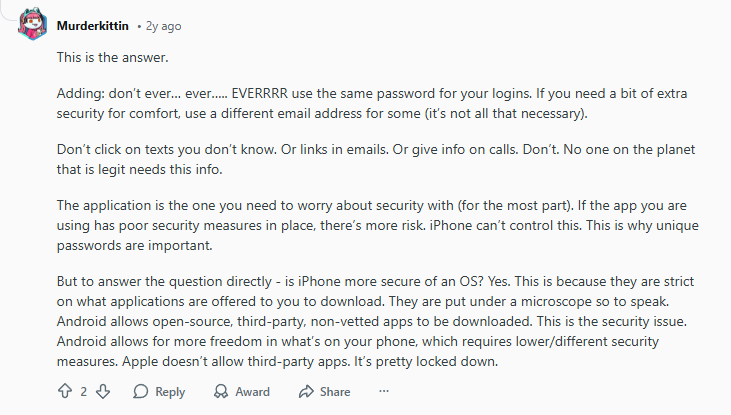
“Adding: don’t ever… ever…. EVERRRR use the same password for your logins. If you need a bit of extra security for comfort, use a different email address for some… Don’t click on texts you don’t know. Or links in emails. Or give info on calls.”
2025 Reality: Password managers and biometric authentication have become standard, but social engineering attacks have grown more sophisticated. Banking trojans now specifically target mobile users on both platforms.
Critical Security Feature: Multi-Factor Authentication (MFA) – (iPhone vs Android)
One user provided the essential definition that still applies:
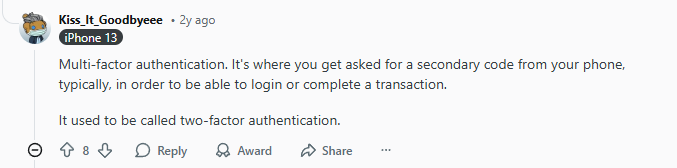
“Multi-factor authentication. It’s where you get asked for a secondary code from your phone, typically, in order to be able to login or complete a transaction. It used to be called two-factor authentication.”
2025 Evolution: MFA has advanced beyond SMS codes:
- Biometric MFA: Face ID/Touch ID on iPhone, fingerprint on Android
- Hardware keys: Physical security keys gaining adoption
- App-based authenticators: Google Authenticator, Authy, Microsoft Authenticator
- Banking-specific: Many banks now offer proprietary MFA apps
Platform Advantage: iPhone slightly leads due to Face ID’s widespread banking app integration and consistent hardware across devices.
2025 Banking Security Comparison: iPhone vs Android (iPhone vs Android)
| Security Aspect | iPhone (iOS 18) | Android (Android 15) | Winner for Banking |
|---|---|---|---|
| App Vetting | Strict manual + automated review | Automated scanning + some manual | iPhone |
| Update Speed | 95% on latest OS in 1 year | 30% on latest OS in 1 year | iPhone |
| Biometric Auth | Face ID (consistent) | Various implementations | iPhone (consistency) |
| Malware Risk | Extremely low | Low (with Play Store only) | iPhone |
| Public Wi-Fi | Built-in protections | Varies by manufacturer | Tie (both need VPN) |
| Banking App Support | 100% of major banks | 98% of major banks | Tie |
| Lost Device Protection | Activation Lock + Stolen Device Protection | Find My Device + varies | iPhone |
| Security Updates | 7+ years guaranteed | 3-5 years (Pixel) | iPhone |
How to Maximize Banking Security on Either Platform (2025 Guide)
For iPhone Users (iPhone vs Android):
- Enable Lockdown Mode (Settings → Privacy & Security) for banking apps
- Use “Hide My Email” for banking signups via iCloud+
- Enable “Stolen Device Protection” (requires Face ID for sensitive actions)
- Restrict banking apps to specific Focus modes
- Use VPN on public networks (more on this below)
For Android Users (iPhone vs Android):
- Enable Google Play Protect (Settings → Security)
- Disable “Install unknown apps” for all apps except trusted sources
- Use Android’s built-in password manager or trusted alternative
- Enable “Find My Device” with remote lock/wipe
- Use VPN consistently (critical for Android on public Wi-Fi)
Universal Best Practices (iPhone vs Android):
- Banking app-only rule: Only download banking apps from official app stores
- Update immediately: Install OS and app updates within 24 hours
- Network awareness: Never bank on public Wi-Fi without VPN
- Regular monitoring: Check accounts daily, enable all notifications
- Physical security: Use strong device passcodes (6+ digits)
The VPN Layer: Essential Banking Protection for Both Platforms
Neither iOS nor Android provides complete protection on public networks. This is where VPNs become non-negotiable for banking security.
Why You Need a VPN for Banking (iPhone vs Android):
- Encrypts all traffic between your device and bank’s servers
- Hides your activity from Wi-Fi snoopers
- Prevents man-in-the-middle attacks on public networks
- Adds location privacy even on cellular data
Best VPNs for Banking Security in 2025:
1. NordVPN: Best All-Around Banking Protection (iPhone vs Android)
Platform performance: Excellent on both iOS and Android with consistent kill switches.
2. Proton VPN: Best for Privacy-Focused Bankers (iPhone vs Android)
Platform performance: Reliable on both platforms with excellent encryption standards.
3. Surfshark: Best for Multi-Device Banking (iPhone vs Android)
Platform performance: Lightweight apps that don’t slow down banking apps on either platform.
Real-World Banking Threat Landscape in 2025 (iPhone vs Android)
Platform-Specific Threats:
iPhone risks:
- Zero-click iMessage exploits (rare but sophisticated)
- Malicious enterprise certificates bypassing App Store
- Social engineering targeting Apple ID credentials
Android risks:
- Fake banking apps in third-party stores
- SMS intercept malware capturing 2FA codes
- Older unpatched devices still in use
Cross-Platform Threats:
- Phishing campaigns mimicking your bank
- Public Wi-Fi snooping at airports/cafes
- SIM swapping attacks (bypassing 2FA)
- Account takeover via credential stuffing
When Platform Choice Actually Matters Most (iPhone vs Android)
Choose iPhone if:
- You want “set it and forget it” security
- You’ll keep the phone 4+ years (update support)
- You use many different banking/finance apps
- You frequently use public Wi-Fi (better VPN integration)
Choose Android if:
- You’re tech-savvy and will implement all security measures
- You prefer customization of security settings
- You use a Google Pixel (best Android security experience)
- You need specific banking apps only available on Android
The Compromise Solution:
Use both platforms with complementary security (iPhone vs Android):
- iPhone for primary banking device
- Android as backup with different accounts
- Both protected by premium VPN
- Shared password manager across platforms
Frequently Asked Questions (2025 Update)
Q: Are banking apps themselves equally secure on iOS and Android (iPhone vs Android)?
A: Generally yes—major banks develop for both platforms with similar security standards. However, iOS apps sometimes receive security updates slightly faster due to Apple’s streamlined update process.
Q: Does iPhone’s closed ecosystem really make it safer (iPhone vs Android)?
A: For average users, yes. The reduced attack surface and consistent updates provide meaningful protection. For expert users who implement all security measures, Android can be equally secure.
Q: Should I avoid mobile banking entirely (iPhone vs Android)?
A: No—mobile banking with proper precautions is safer than desktop in many ways. Biometric authentication, device encryption, and secure elements (like iPhone’s Secure Enclave) provide hardware-level protection desktops often lack.
Q: How often do banking security breaches occur on mobile (iPhone vs Android)?
A: True mobile banking breaches are rare. Most “mobile banking hacks” are actually:
- Users downloading fake apps
- Credential reuse from other breaches
- Public Wi-Fi interception
- Social engineering attacks
The Final Verdict: Which Should You Trust with Your Money (iPhone vs Android)?
For maximum security with minimal effort: Choose iPhone + Premium VPN
Apple’s consistent security updates, strict app controls, and hardware integration provide the strongest baseline protection for the average user. Adding a VPN like NordVPN or Proton VPN or Surfshark covers the public network vulnerability.
For customizable security you’ll actively manage: Choose Android (Pixel) + Premium VPN
Google Pixel devices with stock Android and prompt updates, combined with meticulous security practices (no sideloading, Play Protect enabled, unique passwords), can match iPhone security. The VPN remains essential.
The critical takeaway from the 2022 Reddit discussion that still holds in 2025:
“The application is the one you need to worry about security with (for the most part). If the app you are using has poor security measures in place, there’s more risk. iPhone can’t control this. This is why unique passwords are important.”
Your bank’s security practices, your password habits, and your network precautions matter more than iOS vs Android debates. Both platforms have improved significantly since 2022, but both require your active participation in security.
Bottom line: Whichever platform you choose, enable every security feature, use a premium VPN on all networks, and maintain vigilant banking habits. Your financial safety depends less on Apple or Google’s engineers and more on your security discipline.
Leave a Reply to iPhone Hacked? How to Spot Fake Virus Alerts in 2025 (Real Useful Guide) – VPN Guide Pro Cancel reply